How to Analyze a Suspicious URL Without Opening It: Safe Methods & Warning Signs


Key Takeaways
- Pre-Click Analysis Is the Cheapest Defense: Reading the URL's structure, hovering, expanding shorteners, and using sandboxed scanners all run before the page touches your device.
- HTTPS No Longer Signals Safety: Most modern phishing pages carry a valid HTTPS certificate, so the padlock confirms encryption, not a trustworthy site.
- Newly Registered Domains Are Disproportionately Weaponized: A large share of phishing-flagged domains are used within days of registration, making a WHOIS check one of the strongest pre-click signals.
- A Single Click Moves Faster Than Most Response Plans: Median credential entry after opening a phishing email is tens of seconds, and the fastest intrusions exfiltrate within the hour.
- Guardio Delivers Real-Time Protection Across Every Channel: Guardio provides always-on protection across email, SMS, search results, and ads, stopping phishing attempts before they result in a click or a credential entry, across devices.
You look at a link in an email, a text message, or a search result, and you have to decide in seconds whether it is safe to open. The link looks ordinary and the brand name is right where you expect it. And yet the page on the other side could be a credential-harvesting form that has been live for less than a day.
Modern phishing campaigns have erased most of the visual cues people used to rely on. Lookalike domains carry valid HTTPS certificates, scam landing pages render in pixel-perfect clones of real login screens, and shortened URLs hide the final destination behind a chain of redirects that defeats simple blocklists. The good news is that almost every warning sign you need is visible before the page loads, if you know where to look.
This guide explains how to analyze a suspicious URL without opening it, walking through the structural patterns that give scam links away, the manual lookup methods that confirm them, what happens if you do click one, and how a real-time, device-level protection layer like Guardio closes the gaps that manual inspection alone cannot cover.
{{component-cta-custom}}
Why Analyzing a Suspicious URL Without Opening It Matters
Every other defensive layer activates after the click. Pre-click URL analysis is the only step that runs before the threat ever reaches your device, which is what makes it both the cheapest and often the most effective form of protection.
- Stops Phishing Before Credentials Are Stolen: Phishing pages are designed to capture whatever you type within seconds, and the median time from opening a phishing email to entering credentials on the lure page is measured in tens of seconds. A two-second URL inspection is the only intervention that runs ahead of that timer.
- Reduces the Risk of Malware Infections and Drive-By Downloads: A page can begin a download, push an obfuscated script, or trigger a fake update prompt as soon as it loads. Analyzing the URL beforehand prevents the page from rendering at all, which neutralizes the entire class of drive-by attacks that depend on initial page load.
- Protects Personal and Financial Information: Fake checkout flows, banking login clones, and credential-harvesting forms only collect data once a user has interacted with them. Identifying the URL as suspicious before it loads keeps payment details, account numbers, and identity information out of the attacker’s database in the first place.
- Helps Users Avoid Scam Websites Before Any Interaction: Even a click that does not result in data entry confirms to the sender that the address is live and the device is real. That confirmation alone raises the user’s value on attacker mailing lists and triggers follow-up campaigns. Pre-click analysis prevents the click from happening at all.
Types of Suspicious URLs to Watch For
Suspicious URLs fall into a small number of recognizable patterns, and the table below names each one alongside what it looks like and why it is dangerous.
How Scammers Craft Convincing Malicious URLs
Five techniques recur across nearly every modern phishing campaign. Recognizing the construction makes the warning signs in the next section easier to spot.
- Typosquatting: Attackers register domains that are one or two characters away from a real brand, then host a clone of the real login page. Research analyzing typosquatted domains has found that the .com TLD remains the most common choice, with .xyz, .top, and other low-cost endings making up most of the rest. The technique works because users type the URL or scan the visible domain rather than reading it character by character.
- Subdomain Spoofing: A URL like login.bank.com.attacker.tld reads "bank.com" to a hurried eye, but the real owner is attacker.tld. CISA's official phishing guidance highlights this trick because only the rightmost label before the first slash determines the actual domain owner. Attackers stack legitimate brand names into the subdomain portion specifically because the brain treats the leftmost text as the most important.
- Using HTTPS to Create a False Sense of Security: By the early 2020s, the overwhelming majority of phishing sites were already serving the HTTPS padlock, with public-key infrastructure data showing the share climbing past 90 percent. Free TLS certificate authorities like Let's Encrypt have made this trivial, and a substantial portion of analyzed lookalike domains use them. The padlock now confirms an encrypted connection, not a trustworthy one.
- Leveraging URL Shorteners to Conceal the Final Destination: Threat-intelligence reporting has documented that a meaningful share of phishing campaigns delivered through common link-shortening services route victims to credential-stealing or malware-delivery pages. The shortener strips the visible domain entirely, removing the single most useful pre-click cue. Attackers also chain shorteners across services to bury the final URL even further.
- Injecting Malicious Links Into Legitimate-Looking Search Ads: Search engines block billions of bad ads each year and suspend tens of millions of advertiser accounts as part of their anti-malvertising work, a figure that gives a sense of how active the channel still is. Sponsored results that appear above organic listings can route users to fake software downloads, brand-impersonation login pages, or scam storefronts that pay for placement above the real site.
{{component-tips}}
Core Indicators of a Suspicious URL
The structural giveaways below are the ones that survive across phishing kits, regions, and brands. Read every URL right to left, identifying the registered domain (the part immediately before the TLD) before you decide anything else.
Misspelled or Altered Domain Names
Homoglyphs and character swaps are the workhorses of typosquatting. Patterns to watch for include rn substituted for m, the digit 1 replacing the letter l, the digit 0 replacing the letter o, and accented Unicode characters that render close to their ASCII counterparts.
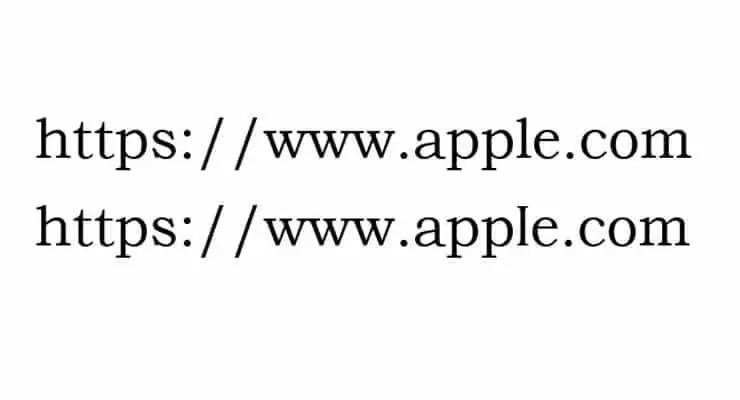
The brands most often impersonated this way are the ones consumers see daily, which is also why the visual check fails most often on those brands.
Long and Confusing URL Strings
Random-looking subdomains, deeply stacked subdomain chains, and double extensions like .pdf.exe are flagged in CISA’s phishing guidance as common deception patterns. A legitimate brand rarely needs five subdomains and a query string of base64. When the URL feels longer than the page it claims to lead to, that disproportion is itself a signal.
Mismatch Between Link Text and Actual URL
This is the cheapest check in the entire workflow. CISA’s guidance directs recipients to hover over links to reveal the actual destination before clicking, citing it as a primary way to detect spoofed hyperlinks.
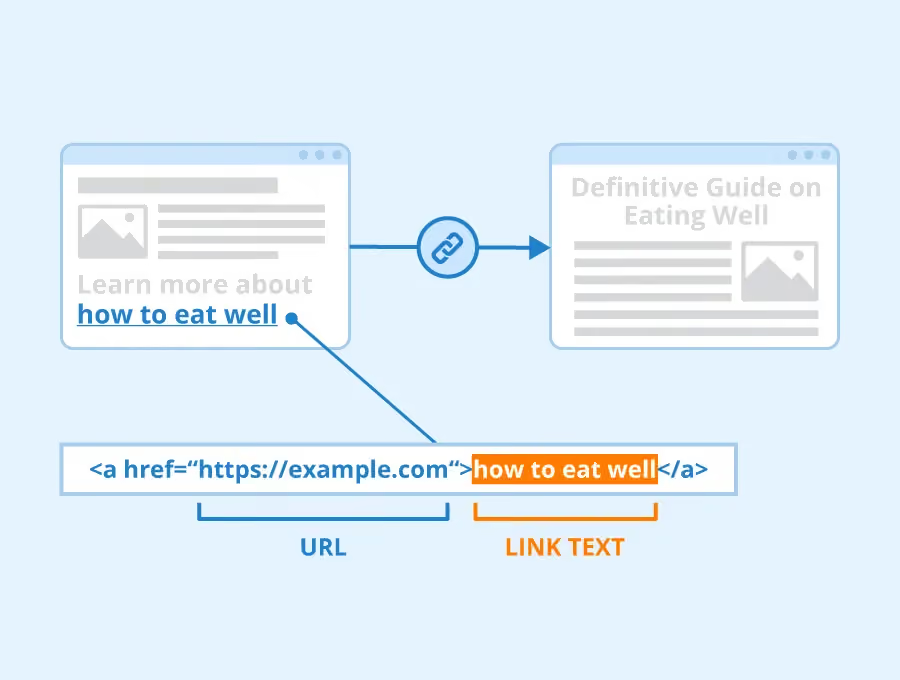
Given the very short median click times documented in industry breach research, a two-second hover pays for itself many times over.
Suspicious File Extensions or Redirect Chains
Executables disguised as documents (invoice.pdf.exe), archive files that contain a single executable, and chains that route through several intermediate domains before the final landing page are all common evasion patterns. Redirect chains specifically are used to defeat URL scanners that only inspect the first hop, so any link that bounces through multiple unfamiliar hosts deserves a sandboxed inspection rather than a click.
How to Analyze a Suspicious URL Without Opening It
The four methods below combine into a workflow that catches almost every common lure without ever loading the page on your device.
What Happens When You Click a Malicious URL
The consequences are the routine outcomes of a single click on a credential-harvesting page.
- Credential Harvesting via Fake Login Pages: The lure page captures whatever you type within seconds of the form being filled. Industry breach research consistently documents median credential-entry times measured in tens of seconds from the moment a phishing email is opened, which means the window between sighting and compromise is far smaller than most users assume. Once captured, credentials are typically replayed against email, banking, and SaaS accounts within minutes.
- Drive-By Downloads That Install Malware Without Your Knowledge: Threat intelligence reporting has tracked sharp year-over-year increases in infostealer malware delivered via phishing, which means a single click on a credential-harvesting page is increasingly enough to surrender saved browser passwords, session cookies, and locally stored authentication tokens. The download often happens silently, with no user-visible prompt.
- Session Hijacking and Cookie Theft: A click can hand over an active session token, which lets the attacker bypass multi-factor authentication on tabs that were already logged in. The user sees nothing unusual, while the attacker accesses the account as the legitimate user until the session expires or is forcibly revoked.
- Redirects That Chain Through Multiple Sites to Avoid Detection: Redirect chains route victims through several intermediate domains before landing on the final phishing page. Each hop on its own may look harmless, but the chain is engineered to defeat scanners that only inspect the first link in the chain. By the time the final page renders, every URL-only check has been bypassed.
- How Attackers Use Your Click to Confirm an Active Target: Even a click that appears to do nothing tells the sender that your address is live and your device is real. That confirmation raises your value on mailing lists, triggers follow-up campaigns from the same operator, and feeds resale of your contact data to other operators. The compressed timeline matters: security research has reported that the fastest quartile of intrusions reach data exfiltration within roughly an hour, which is why pre-click analysis is so much cheaper than post-click response.
What to Do if You Accidentally Open a Suspicious URL
Recovery is straightforward if you act in the right order.
- Do Not Enter Any Information on the Page and Close It Immediately: Do not interact with prompts, do not download anything the page offers, and do not follow any phone number or email shown on the page. If the tab refuses to close normally, force-quit the browser rather than clicking through.
- Run a Security Scan On Your Device: Run a full scan, not a quick scan, because infostealer malware often hides in user-profile folders that quick scans skip. If your endpoint protection offers a deeper offline scan, run that as well to catch anything actively masking itself from the live OS.
- Change Passwords for Any Accounts That May Be Affected: Prioritize email and financial accounts, since email recovery flows can be used to reset everything else. Turn on multi-factor authentication wherever it is not already enabled, and replace any password that was reused on the suspect site.
- Monitor Your Accounts and Email for Unusual Activity: Review recent login locations, billing changes, and forwarding rules. If financial data may have been exposed, freeze your credit and report the URL to APWG (reportphishing@apwg.org), Google Safe Browsing, and the FTC’s ReportFraud.ftc.gov, since those reports feed the blocklists every major browser uses.
Common Mistakes When Checking Suspicious URLs
Four failure modes account for most of the URL checks that miss the mark.
- Trusting HTTPS as a Sign of Safety: The vast majority of modern phishing pages serve HTTPS, so the padlock no longer signals a safe page. It only signals an encrypted connection between your browser and whoever controls the domain, which in many cases is the attacker. Treat HTTPS as the bare minimum, not as evidence of legitimacy.
- Clicking Links From Urgent or Alarming Messages: Smishing and email scams overwhelmingly rely on urgency, fear, and impersonation to push the click. Reported losses to text-message scams have grown several-fold over the past few years, and the messages that work best almost always include a countdown, a threat of account closure, or a fake delivery problem. Urgency itself is a warning sign.
- Ignoring Small Domain Name Differences: A subdomain like login.ab.com.malicious.tld reads as AB to anyone scanning the leftmost text, but the real owner is malicious.tld. Only the rightmost label before the first slash determines ownership, and attackers stack brand names into subdomains specifically to exploit the leftmost-first reading habit.
- Assuming One Check Method Is Always Enough: Threat intelligence reporting has consistently shown that a large share of phishing URLs observed in any given period are unique to detection systems, meaning any single blocklist or scanner has blind spots. Combining structural inspection, sandboxed scan, and WHOIS lookup catches what each one alone misses, and pairing manual checks with an always-on protection layer catches what the user forgets to inspect.
Best Practices to Stay Safe From Suspicious URLs
A short habit list does most of the work, and the table below pairs each practice with why it matters and how to apply it in everyday use.
How Guardio Protects You From Suspicious URLs Across Every Channel
Manual URL inspection works, but it depends on the user remembering to do it on every link, every time, across every device. Guardio closes that gap by providing real-time, device-level protection across the channels where suspicious links actually arrive, including email, SMS, search results, ads, and everyday browsing, so users stay protected without needing to run a separate check every time.
- Scans Pages Before You Open Them to Block Malicious Links: Guardio evaluates destination URLs in real time and blocks known and newly observed phishing pages before they load, reducing exposure to credential harvesting and drive-by downloads without requiring the user to paste links into a separate scanner.
- Filters Phishing Links From Emails and SMS Messages in Real Time: Guardio actively filters phishing links from emails and text messages as they arrive, covering the communication channels where a large share of scam delivery now happens.
- Instant Alerts and Actionable Steps When a Threat Is Detected: Guardio surfaces an inline, on-device warning the moment a risky link is encountered, with clear next steps, so users do not need to research the threat themselves or interpret a generic block page.
- Breach Monitoring That Alerts You When Your Data Is Exposed: Guardio continuously monitors whether email addresses, passwords, and personal data have appeared in known data breaches, helping users act before stolen credentials are used to access their accounts.
These protections run automatically in the background across the user's devices, which is what makes URL safety analysis continuous rather than something users have to remember to do.
Conclusion
Every method covered in this article runs before the click, which is the only window where a suspicious URL is still cheap to neutralize. Reading a URL’s structure, hovering for a real destination, expanding shorteners through public unfurlers, and submitting unfamiliar links to sandboxed scanners are individually fallible and collectively reliable. No single check is enough, and none of them require loading the page on your device.
For users who want that same protection running automatically, Guardio provides real-time, device-level protection across devices and channels. It is built for the way people actually use the internet now, across email, SMS, search, and everyday browsing, catching threats at every point where a suspicious link might appear.
FAQs
Why are scam links getting harder to recognize lately?
Modern phishing pages now copy real brands almost perfectly, including logos, layouts, and HTTPS certificates.
- Don’t trust the padlock icon alone. HTTPS only means the connection is encrypted, not that the site is legitimate.
- Watch for tiny spelling tricks like “paypaI.com” using a capital “I” instead of a lowercase “l.”
- Be suspicious of shortened URLs that hide the final destination behind redirects.
- Treat sponsored search results carefully, especially for banking, streaming, or software downloads.
To understand how attackers disguise malicious sites, read more about phishing scams and how they work.
Can scammers steal information even if I don’t type anything into a fake site?
Yes, some malicious pages can still collect data, track active users, or trigger malware downloads without form submissions.
- Avoid granting browser permissions for notifications, camera, microphone, or downloads on unfamiliar pages.
- Close suspicious tabs immediately if the page starts redirecting or showing fake security warnings.
- Run a security scan afterward if the page behaved strangely or downloaded anything automatically.
- Monitor email and banking accounts for unusual login attempts after exposure.
You can learn more about silent threats and browser-based attacks in Guardio’s guide to malware explained.
How does Guardio help if a phishing site is brand new and not yet widely reported?
Guardio uses real-time behavioral analysis and AI-driven detection instead of relying only on static blocklists.
- Guardio scans suspicious pages before they fully load to stop credential theft attempts early.
- Machine learning identifies scam patterns even when attackers create fresh domains.
- Protection works across browsing, email, texts, and ads where phishing links commonly appear.
- Threat detections shared across users help block emerging scams faster for everyone.
You can explore more about Guardio’s real-time protection features in the Guardio security overview.
What can I do if Guardio blocks a website I actually need to visit?
You can review the blocked site safely from your Guardio dashboard before deciding whether to allow it.
- Check the blocked URL carefully for misspellings, strange subdomains, or fake branding.
- Review recent browsing activity inside the dashboard to understand why the site was flagged.
- Only whitelist sites you fully trust and genuinely recognize.
- Report false positives to Guardio’s security team if you believe the block was a mistake.
For step-by-step instructions, see how to allow or access a blocked website.