TikTok Account Hacked? How to Recover It Safely



Key Takeaways
- Check for unusual logins, profile changes, and unexpected messages
- Reset your password from the official site or app
- Enable two-step verification and review active sessions
- Remove unknown connected apps and extensions
- Real-time link protection can help block phishing pages used in takeovers
TikTok is more than just a social media platform - it’s where creativity thrives, communities grow, and many users build meaningful personal brands or even careers. But when your account gets hacked, that entire digital presence can be compromised in seconds.
Whether you’ve been locked out, noticed strange posts, or received alerts about changed account details, acting fast is crucial. If you still have access, change your password and remove unknown devices. If you're locked out, use TikTok’s recovery tools or reach out to their support team with proof of ownership.
In this guide, we’ll walk you through how to recognize a hack, recover access quickly, lock down your account, and avoid future breaches. You'll also learn how proactive tools like Guardio can stop phishing attacks, fake login pages, and malware before they ever reach your device.
{{component-cta-custom}}
What is a TikTok Account Hack?
A TikTok account hack occurs when someone gains unauthorized access to your profile, often without your knowledge or consent. This can happen through stolen credentials, phishing links, malicious apps, or spyware.
Once inside, hackers may quickly change your login details (like email, password, or phone number), locking you out of your own account. They may also access your private messages, misuse personal data, or even hijack linked accounts such as Google, Facebook, or Apple ID.
In many cases, hacked accounts are used to spread spam, impersonate the original user, or promote scams. Until you regain control, your identity, followers, and content remain at risk. That’s why fast action is essential.
Signs Your TikTok Account Has Been Hacked
Recognizing the warning signs early gives you the best chance to recover your TikTok account before further damage occurs. Here are the most common red flags to watch for:
| Sign | What It Means |
|---|---|
| You’re Locked Out of Your Account | You can’t log in, even with the correct password, suggesting someone else has changed it. |
| Password, Email, or Phone Number has Been Changed | Recovery details have been updated by a hacker to block you from regaining access. |
| Suspicious Content is Being Posted Without Your Consent | Strange videos, spam links, or comments appear under your profile without your knowledge. |
| You Receive Alerts for Unrecognized Logins | TikTok warns about logins from devices or locations you don’t recognize. |
If you notice any of these warning signs, take them seriously. The sooner you act, the higher your chances of a quick recovery. Waiting too long could mean losing full control of your account.
Steps to Recover a Hacked TikTok Account
If your TikTok account has been hacked, time is critical. Follow these steps to regain access and secure your profile:
- Change Your Password Immediately if Accessible
If you can still log in, update your password right away. Choose something strong and unique, not reused from any other accounts, to lock the hacker out. - Recover Account Using Email or Phone Number
Use TikTok’s “Forgot Password” option to reset access through your registered email or phone number. This works if the hacker hasn’t already changed your recovery details. - Submit a Recovery Request to TikTok Support
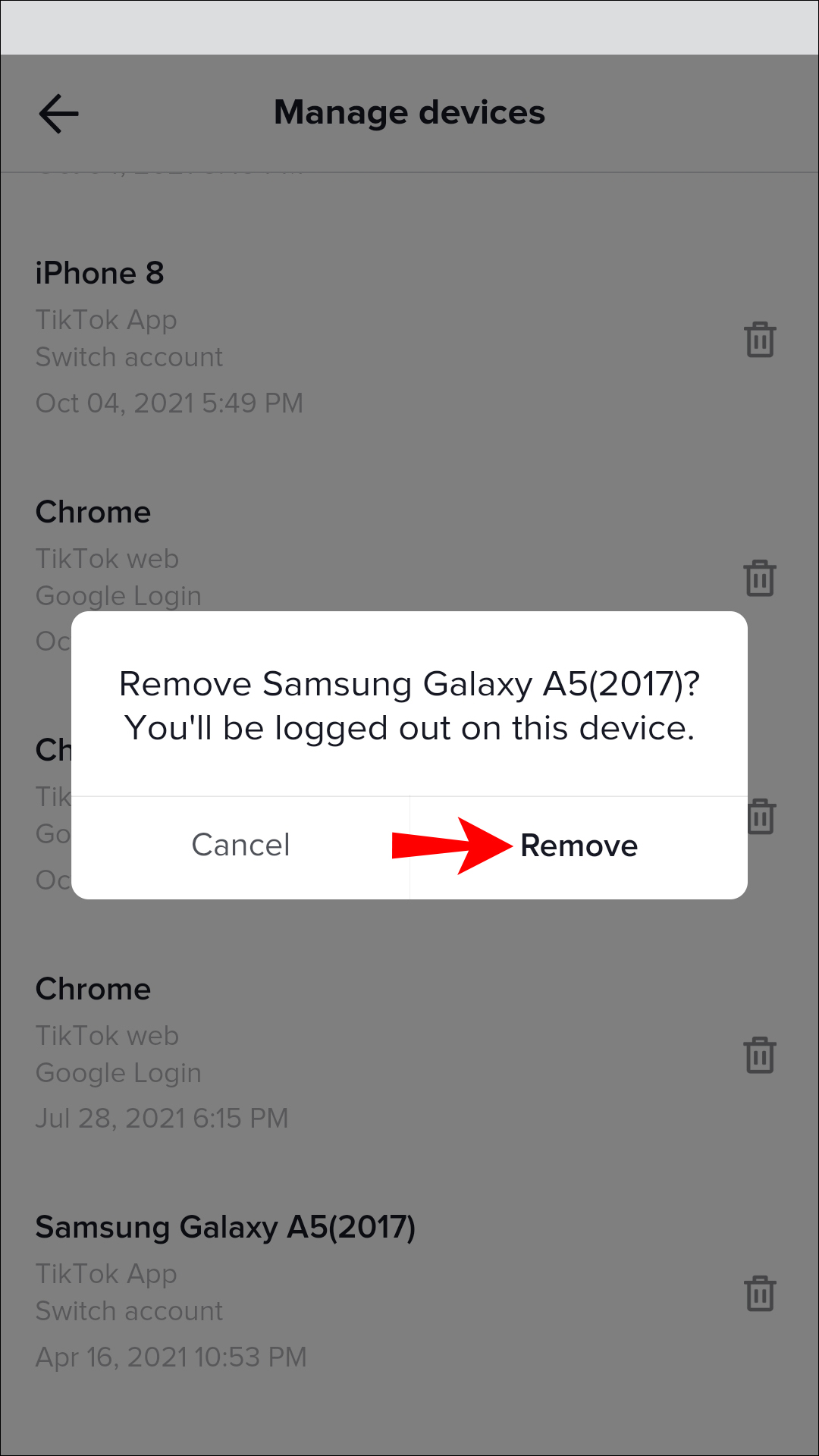
If your recovery details were changed, go directly to TikTok Support. You may need to provide identity verification or proof of account ownership. - Remove Unauthorized Devices from Account Settings
Once you’re back in, check your login history and remove any suspicious devices. This ensures the hacker is logged out and can’t regain access.
Acting quickly not only helps you regain your account but also prevents hackers from misusing it to spread scams or impersonate you.
Why and How TikTok Accounts Get Hacked
TikTok’s popularity has also made it a top target for cybercriminals. Attackers rely on a mix of technical exploits and psychological manipulation to gain access to user accounts. Below are the most common ways TikTok accounts get hacked and why they work.
Weak Password Hygiene and Credential Stuffing
Many users still rely on weak passwords or reuse the same password across multiple accounts. Hackers take advantage of this by running credential stuffing attacks, where they use massive databases of leaked usernames and passwords from other sites to try logging into TikTok. If you’ve reused a password that was exposed in another data breach, hackers can often gain instant access without even needing to “hack” TikTok directly.
Phishing and Fake Login Pages
One of the most common attack methods is phishing. Hackers create fake TikTok login pages or send emails, texts, and DMs that look official. These messages often warn of account suspension or promise verification badges, pushing you to “log in” quickly. The moment you enter your credentials, they are sent straight to the hacker. Phishing works because it preys on urgency and trust, tricking users into giving away access voluntarily.
Social Engineering or Impersonation Attempts
Hackers don’t always rely on technology; sometimes they rely on manipulation. Social engineering attacks involve emotional luring or pretending to be TikTok staff, brand representatives, or even someone you know.
There’s a growing scam on TikTok and Instagram featuring emotional videos of people saying they’re being forced to shut down their cow farm or dog shelter.
Guardio (@GuardioSecurity) June 24, 2025
These accounts link to donation pages or websites selling "handmade" items like cow slippers or dog lamps.
For example, a scammer might reach out claiming to seek a donation and then request your login details to “verify ownership.” Others may impersonate TikTok’s support team and trick you into clicking malicious links. These attacks often succeed because they exploit human behavior, not system flaws.
Malware from Browser Extensions or Apps
Not all hacks happen through direct scams. Some come through malicious apps and browser extensions. Downloading pirated apps, unofficial TikTok “enhancers,” or shady APKs can secretly install malware on your device. This malware runs in the background, capturing keystrokes, login sessions, and even security codes. Some browser extensions may seem harmless but secretly log everything you type, including your TikTok login. These hidden threats often go unnoticed until it’s too late.
High Engagement Accounts as Prime Targets
While any account can be hacked, those with large followings or high engagement are prime targets. Hackers hijack these accounts to spread spam links, promote scams, or sell access to other cybercriminals. For influencers or creators, this can be devastating not only because of the lost audience but also because impersonation can damage reputation and brand partnerships. Even small accounts aren’t safe, but the more followers and visibility you have, the more attractive your profile becomes.
What to Do If You Can’t Recover Your TikTok Account
Sometimes, even after multiple attempts, standard recovery methods don’t work, especially if a hacker has already changed your email or phone number. If that happens, don’t give up. Here are the steps you can take next:
| Step | What to Do |
|---|---|
| Use Alternative Recovery Options Provided by TikTok | Try logging in with your username or use the in-app “Report a Problem” option to request support. |
| Submit Identity Verification Details | Provide documents like a government-issued ID or past account details so TikTok can confirm ownership. |
| Monitor Recovery Emails and App Alerts for Access Links | Keep checking your inbox and TikTok notifications for temporary login links or verification codes. |
| Secure Linked Accounts (Google, Facebook, Apple ID) | Update passwords and enable two-factor authentication on any connected accounts to block re-entry. |
If none of these options work, stay persistent with TikTok Support. Recovery often takes time, but is usually possible with the right proof.
How to Protect Your TikTok Account from Being Hacked
Recovering your account is only half the battle. The real goal is preventing hackers from getting in again. Here are the most effective ways to secure your TikTok account:
Use a Unique and Strong Password
A strong password is your first line of defense. Avoid simple combinations with names or with a number. Instead, use a mix of uppercase and lowercase letters, numbers, and special characters. Most importantly, don’t reuse the same password across multiple accounts.
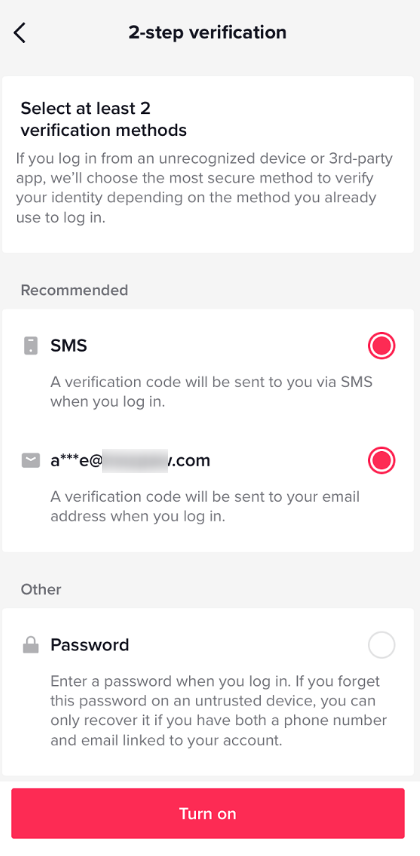
Enable Two-Factor Authentication (2FA)
Two-factor authentication adds an extra layer of security by requiring a code sent to your phone or email each time you log in. Even if hackers steal your password, they can’t access your account without this second verification step.
Avoid Suspicious Links or Messages in DMs
Phishing scams often spread through TikTok DMs or fake “official” messages. Never click on links that promise free followers, verification badges, or giveaways. Even if a suspicious message appears to come from a friend, treat it with caution.
Limit Permissions for Third-Party Apps
Some third-party apps claim to boost followers or enhance TikTok features but may secretly steal your login details. Only connect apps you fully trust, and review permissions regularly in your TikTok account settings.
This week's #phishoftheweek is a scam claiming it can get you thousands of #TikTok followers. Once you choose the number of followers you want, they'll ask you to verify your account. However, the site redirects you to various fraudulent sites that aim to steal private info. pic.twitter.com/6k4Wnfdx2J
Guardio (@GuardioSecurity) July 13, 2023
Monitor Your Login Sessions Regularly
TikTok allows you to check which devices are logged into your account. Visit your account settings often to spot any unfamiliar devices or locations, and immediately remove them if they don’t belong to you.
{{component-tips}}
How to Secure Your Device After a TikTok Hack
If your TikTok account has been hacked, it’s not enough to just recover your login. Hackers often leave behind hidden malware or use your device as a backdoor to steal more data. Securing your phone, tablet, or computer after a breach is just as important as recovering your account. Here’s what you should do:
Scan for Malware or Spyware
Hackers sometimes plant keyloggers, spyware, or trojans that keep stealing data even after you reset your TikTok password. Run a full scan using a trusted antivirus or anti-malware app. Delete or quarantine anything suspicious to prevent further leaks.
Reinstall or Update Your Browser
Outdated browsers and shady extensions are common hacker entry points. Update your browser to the latest version, or reinstall it for a clean slate. Remove extensions you don’t recognize, as some could be secretly tracking your logins.
Change Passwords for Other Linked Accounts
If TikTok is linked with Google, Facebook, or Apple ID, update those passwords immediately. Hackers often try “account hopping” to gain wider access. Use unique passwords and enable two-factor authentication (2FA) to shut the door on attackers.
How to Report a Hacked TikTok Account
If your TikTok account has been hacked and you can’t access it, reporting directly to TikTok is the most reliable way to get your account back.
| Step | Description |
|---|---|
| Navigate to TikTok Support Request Portal | Go to the official TikTok Help Center or use the in-app “Report a Problem” option to file a support request directly with TikTok. |
| What Information TikTok Requires to Verify Identity | TikTok may ask for details such as your registered email, phone number, username, government-issued ID, or proof of account activity. |
| Typical Timelines for Support Response and Recovery | Support responses usually take a few days, but recovery may take longer depending on case complexity and proof verification. |
While response times vary, providing accurate details upfront helps TikTok verify your identity faster and improves your chances of recovery.
How Guardio Blocks TikTok Hacks Before They Start
TikTok’s popularity makes it a prime target for scammers. From AI-generated fake login pages to fraudulent sites pushed by fake influencers or hacked accounts, attackers use every trick to steal credentials. Guardio identifies these threats early and blocks them across desktop and mobile, helping protect your TikTok presence.
- Guards Against Social Engineering and Phishing Traps: Guardio spots phishing attempts across emails, texts, and fake TikTok pages, warning you before you enter login details or click malicious links.
- Detects Leaked Credentials and Suspicious Activity: Guardio continuously monitors for signs of account compromise, alerting you to data breaches, reused passwords, and unusual login patterns tied to your TikTok or connected accounts. It also scans breach data to alert you if your TikTok credentials or linked accounts show up in dark web leaks, helping you act before hackers do.
- Blocks Phishing Links Before You Click: Guardio stops access to fake login pages and malicious sites, including those promoted by fake influencers or compromised accounts.
- Adds Layered Protection During Recovery: During password resets or re-verification, Guardio keeps your device secure from spyware and silent session hijacks that could sabotage the process.
- Prevents Repeat Attacks with Real-Time Defense: Guardio doesn’t stop at one-time alerts. It stays active in the background, preventing repeat phishing or malware attempts targeting your account.
Conclusion
Getting your TikTok account hacked can be stressful, but acting quickly and following the right steps makes recovery possible. Always watch for warning signs, use TikTok’s recovery tools, secure your linked accounts, and strengthen your password and 2FA settings.
Tools like Guardio provide cross-platform protection, blocking phishing attempts, suspicious logins, and malware before they reach your account. By staying vigilant and using smart security practices, you can keep your TikTok account and all your linked data safe.
{{component-cta-custom}}
FAQs
How do I know if my TikTok account was compromised?
Common signs include password reset emails you didn’t request, new devices or locations in your account, changed profile details, or videos/messages you didn’t post. If anything looks off, secure your email first, then TikTok.
What if I’m locked out and password reset isn’t working?
Use TikTok’s in-app account recovery options and support flow. If your email/phone was changed, you’ll need to verify identity through TikTok’s official channels. Avoid third-party "recovery" services.
Should I enable 2-step verification on TikTok?
Yes. 2-step verification adds a second check at login and reduces the chance of repeat takeovers. Use an authenticator app when possible, and keep backup codes stored safely.
How can I avoid fake TikTok login pages?
Don’t log in from links in DMs, emails, or texts. Open TikTok directly, type the URL yourself, and be cautious of "verification" or "appeal" links that pressure you to act fast.
What should I do first after I regain access?
Change your password, enable two-step verification, review active sessions, and remove unknown connected apps.
How do account takeovers usually happen?
Common causes include phishing links, reused passwords from older breaches, and risky extensions or apps that capture logins.