Is This Website Legit? 12 Checks Before You Buy (Quick Checklist)


Key Takeaways
- Verify the domain and the checkout flow before you pay.
- Do not trust the padlock alone. Scam sites can use HTTPS too.
- Avoid irreversible payment methods on unknown stores.
- If you already paid, save proof and contact your payment provider quickly.
If you cannot quickly confirm that a store is legitimate, do not test it with your card. A safer approach is to verify the domain, the return and contact policies, and the checkout flow first. If any of those feel inconsistent or incomplete, buy through a retailer you already trust instead.
{{component-cta-custom}}
Why fake stores can look normal right up to checkout
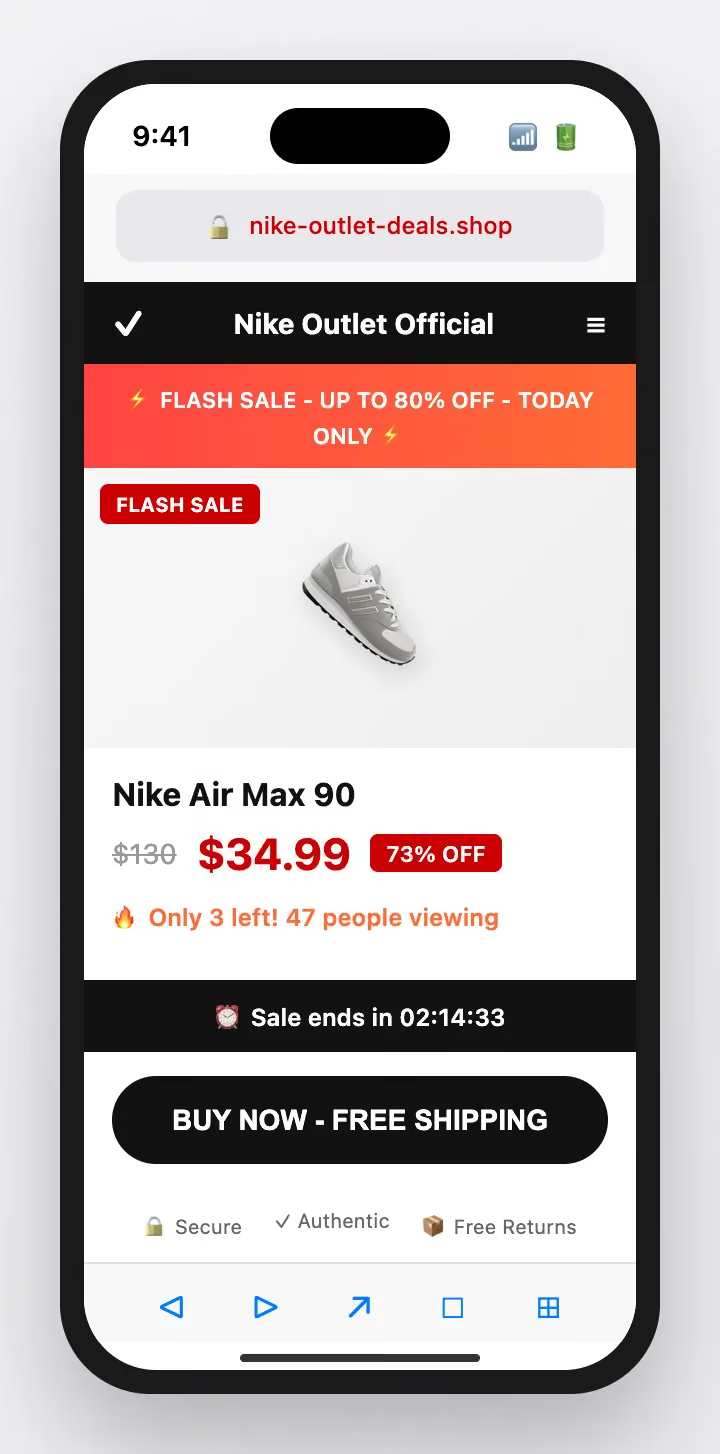
Modern fake stores are built to look clean: real product photos, familiar layouts, even HTTPS. The design is not the scam. The scam is what happens when you try to pay, return, or contact support.
A useful mental model is this: a legitimate store has to support customers after the sale. A fake store only has to collect money. When a site makes paying easy but makes returns, support, or verification difficult, that imbalance is usually intentional.
A legitimate store has three things: a stable domain, a real support path, and payment methods that allow disputes. Fake stores usually only have one: a checkout page.
In 2026, fake stores are often generated from templates in minutes, then rotated across new domains when complaints start. That is why domain and checkout behavior matter more than design, and why real-time site warnings can save you when the page looks perfect.
What fake stores struggle to fake
Domain: look for small spelling changes, extra words, or odd endings. Scam stores rotate domains because they burn them quickly.
Checkout behavior: legitimate checkouts have predictable totals and known processors. Fake stores often redirect oddly or introduce “fees” late.
Policies: real returns and shipping policies are specific (timelines, address, exceptions). Scam policies are vague or copied across many sites.
Contact and support: a real store has a support path that works before you pay. Scam stores hide contact details or answer with scripts only after checkout.
Payment methods: if they steer you toward irreversible payments, it is usually to avoid disputes and chargebacks.
What the store is trying to make you do quickly
You arrived from an ad or DM link: close it and open the official site yourself.
The discount is extreme: assume higher risk and verify harder.
The payment method is unusual: stop (gift cards, crypto, wire are common in fraud).
The site looks normal but policies are thin: treat as caution and verify independently.
Before you buy, run these 12 quick checks
- Read the domain carefully (extra words, misspellings, odd endings).
- Open the site from a path you control (typed URL or bookmark, not an ad link).
- Check the checkout domain and processor (unexpected redirects are a stop sign).
- Look for a real support path (working contact + non-generic replies before purchase).
- Scan the return and shipping policy for specifics (timelines, address, exceptions).
- Search the store name + “scam” and the domain + “scam”.
- Check domain age/ownership via ICANN Lookup (brand mismatch = higher risk).
- Check Safe Browsing status for current warnings.
- Compare pricing to reality (extreme discounts are usually bait).
- Prefer dispute-friendly payments (avoid gift cards, crypto, wire transfers).
- Use a unique password if you create an account (assume reuse will be tested later).
- Save proof (screenshots of product + checkout) before you pay.
Common scripts you will see (and how to handle them)
You found the site through a sponsored search result
Sponsored results can be used by lookalike sites. The safe move is not to trust the ad link.
Instead, type the brand URL yourself or use a bookmark, then navigate from the homepage.
The store looks real, but policies are thin
Fake stores often copy templates and leave policies vague. Policy quality is a better signal than the logo.
Instead, copy a sentence from the policy into search. If it appears across many unrelated sites, stop.
They only accept gift cards or crypto
Those methods are hard to reverse, which is exactly why scammers prefer them.
Instead, do not buy. Choose a safer seller or payment method.
If you already clicked or replied, what matters now
If you entered card details: contact your issuer, monitor transactions, and ask about replacement if anything looks off.
If you created an account: change that password everywhere you reused it and secure your email account too.
If you already paid: save screenshots/receipts and start a dispute or chargeback through your payment provider (not the store’s links).
If you clicked follow-up tracking/refund links: stop clicking, close the page, and treat the next messages as second-scam attempts.
When it is worth reporting, and who to report to
Report fraud:ReportFraud.ftc.gov
Report cybercrime:FBI IC3
Report scam ads: use the ad platform or search engine reporting tools.
Related guides
How to Check if a Website Is Safe to Buy From
How to Detect Fake Shopping Sites (2026 Guide)
Sources
ICANN: Registration data lookup tool
Guardio Labs: Scamlexity research on AI browsers and fake shops
FAQs
Does HTTPS (the padlock) mean a site is safe?
No. HTTPS means the connection is encrypted. Scam sites can also use HTTPS. Use multiple checks, not just the padlock.
What are the biggest red flags of a fake shopping site?
Odd domains, urgent pressure, missing or copied policies, and checkout flows that feel unusual for the brand are common red flags.
Is it safe to buy from a site I found on social media?
Be cautious. Open the official brand site directly and verify the domain and policies before buying.
What payment methods are safest online?
Use methods with buyer protection and dispute options. Avoid gift cards, crypto, and wire transfers when you are unsure.
How can I verify a store without clicking an ad link?
Type the URL yourself or use a saved bookmark. Then verify policies, reviews, and the checkout flow.
What should I do if I already bought from a suspicious site?
Contact your payment provider quickly, document everything, and monitor for follow-up fraud attempts.