How to Detect Fake Shopping Sites (2026 Guide)


Key Takeaways
- Start with the safest fix: official settings and known-good steps
- Remove or disable suspicious extensions and downloads
- Avoid logging in from links; go to the official site directly
- If you entered details, change your password and enable two-step verification
- Real-time link protection helps reduce exposure to lookalike sites
Fake shopping sites are no longer easy to spot. In the age of AI, scam stores don’t look shady or broken - they’re designed to look polished, professional, and convincingly complete with real-looking product photos, glowing reviews, fast checkout pages, and even customer support chat.
Instead of judging a store by how it looks, focus on how it behaves. Most fake stores spread through sponsored ads, social media posts, and “limited-time” discounts, push prices that feel just a little too good to miss, and rush you into entering card details before you have time to think. Behind the scenes, they’re built to help scammers steal payment information, collect login credentials, or trigger follow-up phishing attempts.
This guide shows you exactly how to detect fake shopping sites, where they come from, the signs most people overlook, how AI is making them harder to spot, and what to do if you’ve already interacted with one. You’ll also learn simple, practical checks you can use in seconds, before any damage happens.
{{component-cta-custom}}
What Is a Fake Shopping Site?
A fake shopping site is a fraudulent website designed to look like a real online store but exists to scam shoppers and not to deliver products.
These sites often copy the layout of legitimate brands or marketplaces, display professional product images, and offer attractive discounts to build trust quickly. Once a shopper places an order or creates an account, the site may steal payment details, collect personal information, or disappear entirely.
Some fake shopping sites never ship anything at all. Others send low-quality or counterfeit items just to appear legitimate and delay chargebacks. In many cases, the real damage happens later through card fraud, account takeovers, or follow-up phishing emails using the information the shopper already shared.

What makes fake shopping sites especially dangerous today is that they don’t rely on sketchy pop-ups anymore. They spread through sponsored ads, social media posts, fake discount codes, and lookalike domains that closely mimic trusted brands, making them easy to miss, even for careful shoppers.
How Fake Shopping Sites Steal Your Information
The real danger of fake shopping sites isn’t just a missing package but it’s what happens to your information the moment you interact with them. By the time you realize something feels off, your information may already be reused for fraud or follow-up scams. Below is a table showing how fake shopping sites actually collect your data, often without you realizing it:
| Attack Method | How It Works | What Gets Stolen | Why It’s Dangerous |
|---|---|---|---|
| Credential Theft Through Fake Login Pages | Fake sign-in or account creation before checkout | Emails, passwords | Reused logins lead to account takeovers |
| Payment Fraud and Stolen Card Details | Fake checkout collects card data | Card numbers, CVV | Immediate charges or resale for fraud |
| Malware Hidden in Order Files | Malicious invoice or tracking downloads | Device data, saved passwords | Silent spying or harmful extensions |
| Phishing Through Fake Receipts | Fake order or shipping emails with links | Logins, personal info | Trusted-looking follow-up scams |
Types of Fake Shopping Sites
Some of the fake shopping sites mimic well-known brands, while others hide behind generic storefronts or marketplaces. These are the most common types shoppers run into today:
1. Lookalike Brand Stores
These sites use typosquatting and domain permutation techniques (extra words, hyphens, country codes, or subtle misspellings) to mimic real brand domains.
Always check with the official delivery company’s website - don’t trust search results or links in texts or emails.
Guardio (@GuardioSecurity) December 10, 2025
Safe shopping 🛒 pic.twitter.com/lQywh2ae5S
Templates, logos, and CSS are often scraped directly from the legitimate site, while checkout and login endpoints are routed to attacker-controlled servers. Many are deployed behind CDNs or shared hosting to hide origin infrastructure and rotate domains once flagged.
2. Counterfeit Product Websites
These stores are typically drop-in storefronts built with cloned catalogs and stock images, often generated or enhanced using AI. The backend focuses less on fulfillment and more on data collection at checkout, sometimes skipping real payment processing entirely.
Shopping on these sites could lead to your credit card information being stolen and charged. Make sure to warn others and only shop on the official stores.#scamalert @JoAnn_Stores @Meta pic.twitter.com/x6319dsw9F
Guardio (@GuardioSecurity) March 11, 2025
In some cases, payment forms are wired directly to logging scripts rather than payment gateways.
3. Short-Lived or Newly Registered Domains
Scammers rely on rapid domain churn by registering domains, launching ad campaigns, and shutting everything down within days or weeks. Automation tools handle domain setup, SSL certificates, and hosting in minutes. This approach helps them stay ahead of takedowns, reviews, and chargeback tracking.
The 14 Best Tips For Safe Online Shopping, #3:
Guardio (@GuardioSecurity) November 13, 2021
*Make sure you are on the right website*
A lot of phishing websites emulate the original website to try to get you to submit your personal information. pic.twitter.com/8ZDpdji526
4. Unverified or Impersonated Marketplace Sellers
These scams exploit platform trust signals. Attackers create seller accounts using synthetic identities or hijack inactive profiles. Communication is often pushed off-platform (email, messaging apps) to avoid marketplace monitoring. Once payment is collected, listings disappear, or seller accounts go dormant.
How Fake Shopping Sites Spread Across Ads, Social Media, and Search
Fake shopping sites don’t spread by accident. They’re deliberately pushed through ads, social media, and search systems that shoppers already trust.
- Sponsored Ads Leading to Scam Stores: Scammers abuse legitimate ad platforms with fresh domains and clean creatives, then rotate domains and landing pages to evade enforcement.
- Fake Social Media Profiles and Brand Impersonation: Lookalike brand pages copy visuals and engagement patterns, often boosted by bots, to build trust before pushing scam links into feeds and comments.
- Scam Discount Codes and Viral Offer Posts: Urgency-driven posts use limited-time offers and layered redirects to mask scam destinations and bypass link scanning systems.
- Manipulated Search Results and Clone Domains: Clone sites target long-tail shopping queries using SEO abuse, domain freshness, and keyword stuffing to temporarily rank as legitimate results.
Signs to Detect Fake Shopping Sites
Fake shopping sites don’t usually fail in one obvious way. Instead, they leave behind small technical and behavioral signals that, when combined, reveal what’s really going on.
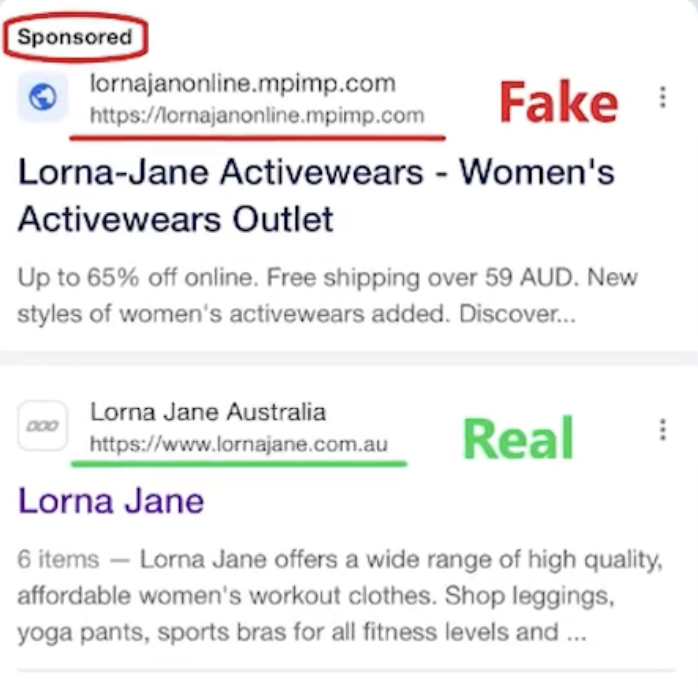
1. Strange or Misleading URLs: Lookalike domains often use extra words, hyphens, misspellings, or country codes to mimic real brands while pointing to attacker-controlled sites.
2. Too-Good-To-Be-True Prices or Flash Sales: Extreme discounts and constant countdown timers are used to rush decisions and prevent basic verification checks.
Scammers are exploiting the hype by setting up fake sites that claim to offer exclusive deals on Stanley Tumblers. We're actively monitoring and blocking these fraudulent sites, which are promoted through social media ads. @StanleyBrand #phishoftheweek pic.twitter.com/jCsLnhu7zE
Guardio (@GuardioSecurity) January 25, 2024
3. Missing or Fake Contact Information: Scam stores rely on generic email forms, copied addresses, or unreachable phone numbers to avoid accountability after checkout.
4. No HTTPS or Insecure Checkout Pages: Some scam sites still lack HTTPS. Others use HTTPS but route you through checkout flows that look real while collecting card details directly.
5. Lack of Authentic Social Media Presence or Reviews: Recently created profiles, empty pages, or repetitive reviews indicate a store with no real operating history.
How AI Makes Fake Shopping Sites Harder to Spot
AI has removed many of the visual and behavioral flaws that once made scam shopping sites easy to identify. Today, fake stores can look polished, responsive, and trustworthy even though there’s no real business behind them.
AI-Generated Product Photos and Catalogs
Scammers use generative models to create realistic product images, lifestyle shots, and full catalogs without owning inventory. These images are unique, high quality, and free from the stock-photo patterns people used to rely on as warning signs.
AI-Written Reviews and Testimonials
Language models generate reviews that sound natural, varied, and emotionally believable. This eliminates repetitive phrasing, broken grammar, and other red flags that previously exposed fake feedback.
Deepfake Customer Support Chats
Some fake stores deploy AI-powered chat systems that mimic human support agents. These chats can answer questions smoothly, reassure shoppers, and guide them toward checkout without revealing inconsistencies.
AI Bots Responding to Shoppers in Real Time
Automated agents handle objections, personalize responses, and apply urgency at scale. This allows scam sites to interact with thousands of shoppers simultaneously, increasing conversions before users have time to verify legitimacy.
What to Do if You Entered Information on a Fake Shopping Site
If you’ve already entered details on a fake shopping site, acting quickly can limit the damage. Focus on securing accounts first, then monitoring for follow-up abuse.
- Secure and Reset Your Accounts: Change passwords on any account that shares the same email or credentials, and enable two-factor authentication where available to block account takeovers.
- Monitor Charges or Freeze Your Credit Cards: Watch for unauthorized transactions and contact your bank immediately. In many cases, temporarily freezing or replacing the card prevents further misuse.
- Remove Suspicious Extensions or Software: Uninstall any browser extensions, apps, or files downloaded from the site, as these are often used to steal data silently.
- Check for Data Breach Alerts: Monitor breach notifications to see if your email or credentials appear in known leaks, which often follow scam shopping attempts.
- Report the Fake Website: Reporting the site to your browser, payment provider, or local cybercrime portal helps limit how long the scam stays active.
{{component-tips}}
Best Practices for Safe Online Shopping
A few simple habits can dramatically reduce your risk when shopping online even as scam stores become more convincing.
| Best Practice | What to Do | Why It Matters |
|---|---|---|
| Shop from Verified Websites | Buy from established brands with official domains and real history | Reduces exposure to short-lived scam stores |
| Avoid Suspicious Links & Ads | Skip urgent offers from ads, pop-ups, or messages | Scam stores are often distributed via paid ads |
| Use Secure Payment Methods | Prefer credit cards or protected payment services | Enables fraud detection and chargebacks |
| Check Domain Age & Policies | Review domain age, customer reviews, and return terms | Fake sites rarely have long-term credibility |
| Keep Devices Updated | Install browser and OS updates regularly | Blocks exploits used by malicious scripts |
Protect Yourself from Fake Shopping Sites with Guardio
Guardio is designed to reduce the risk of online scams before damage happens. It combines proactive scam and phishing protection, data leak alerts, and account security insights to help you spot risk early and take action fast - across mobile and desktop.
- Real-Time Warnings Before You Open Scam Websites: Guardio warns you before you enter sites that show signs of fraud, giving you a chance to back out before any damage happens.
- Safety Checks on URLs, Domains, and Checkout Pages: Guardio checks sites for signals of scams and phishing and blocks dangerous pages in real time.
- Phishing Defense for Messages: Guardio helps stop phishing attempts delivered through email and SMS.
- Stops Scam Links Before They Spread: Guardio blocks dangerous destinations in real time, reducing the chance that a single click turns into a scam checkout.
- Protection From Lookalike Scam Sites: Guardio helps block dangerous pages, including many lookalike scam destinations used in phishing and shopping fraud.
- Provides Scam Protection and Secure Browsing Across All Your Devices: One Guardio subscription helps protect your browsing, accounts, and personal information across devices wherever you shop online.
Conclusion
Fake shopping sites aren’t a fringe problem anymore. They blend into ads, search results, and social feeds, using polished design and AI-generated content to look legitimate until it’s too late.
The key to staying safe isn’t spotting every scam by eye, but it’s about understanding the patterns behind how these sites operate, knowing the signals they leave behind, and slowing down before sharing payment or personal information. Simple checks, like reviewing return policies or verifying domains, can prevent most scams before damage happens.
Tools like Guardio add another layer of protection by catching risky sites and deceptive links early, helping you avoid fake shopping sites before they have a chance to steal your data. Combined with smart shopping habits, that prevention-first approach makes online shopping safer even as scams continue to evolve.
{{component-cta-custom}}
FAQs
How can I instantly verify if an online store is safe for my kids or family to use?
Check the site’s behavior, not just its design, using these quick checks.
- Ask simple questions like “Where is your return center?”a real store will have a clear answer.
- Hover over links before clicking; hidden redirects are a red flag.
- Test support responsessend a quick product question and see if you get a human reply.
- Use Guardio’s URL checks to see if the site is already flagged as unsafe.
For families, tools like Mobile Browsing Protection help keep kids safer from scammy shopping links on mobile.
What can small business owners do to avoid fake supplier scams?
Use these steps to vet B2B suppliers before paying or sharing business info.
- Search the domain on Googlereal businesses usually have multiple web mentions.
- Check their “About” and “Returns” pagesgeneric or vague language is a red flag.
- Use Guardio’s extension to flag suspicious domains instantly before checkout.
- Avoid making payments via wire or crypto unless you’ve confirmed legitimacy.
Small businesses can add extra coverage with Guardio for Business for team-wide scam defense.
What should I do if I think a shopping site stole my info?
Move fast, the first hours matter most.
- Change passwords on any reused accounts, and add 2FA.
- Freeze or replace your card to stop follow-up fraud.
- Check your device for malware if you downloaded anything.
- Report the site to your browser and credit card company.
Guardio Premium alerts you about data leaks fast so you can act before identity theft happens.
Does Guardio automatically block fake shopping sites?
YesGuardio flags dangerous stores and blocks scammy checkout pages in real time.
- You’ll see an alert before the site loads if it’s linked to fraud.
- Guardio’s AI looks at behavior, not just looks, so even polished sites get caught.
- If a site is blocked and you believe it’s legit, you can review and override it safely.
- View your blocked sites anytime on your Browsing Activity Page.
To understand why a site was blocked, check this explanation.
How do I protect my family across devices from fake stores and scam ads?
One Guardio account protects everyone you care about.
- Install the Guardio extension on every browser your family uses.
- Set up the mobile app to block fake stores on phones and social media.
- Add up to 5 users under your Guardio Premium plan for complete coverage.
- Check blocked sites and alerts for each device in the dashboard.
You can invite your family directly using the Premium protection sharing feature.