How to Check if a Website Is Safe to Buy From Before Shopping Online



Key Takeaways
- Start with the safest fix: official settings and known-good steps
- Remove or disable suspicious extensions and downloads
- Avoid logging in from links; go to the official site directly
- If you entered details, change your password and enable two-step verification
- Real-time link protection helps reduce exposure to lookalike sites
Shopping online should be easy: find what you want, check out, and move on. But in 2026, even careful shoppers can get caught off guard, because the riskiest sites are designed to feel normal right up to the moment you pay.
Fraudulent websites now look almost identical to legitimate stores in the age of AI-driven scam kits and automated storefront builders. They use professional designs, familiar branding, and secure-looking checkout pages. Many can be launched quickly, promoted through ads or social media, and shut down before anyone can report them.
That’s why knowing how to check if a website is safe to buy from matters more than ever. This guide explains what unsafe shopping sites look like, where they appear, how to verify them before entering any payment details, and what to do if you’ve already made a purchase.
{{component-cta-custom}}
Why Online Shopping Scams Are Harder to Spot Today
Online shopping scams have evolved significantly. What used to be obvious fake stores with broken layouts and misspelled text now look polished, professional, and trustworthy at first glance.
AI-Generated Fake Stores and Product Listings
Scammers now use AI tools to create convincing e-commerce websites in minutes. These tools generate realistic product descriptions, professional images, and even customer reviews that appear authentic. The result is a storefront that looks like any legitimate retailer. Logos are clean, navigation works smoothly, and product pages include detailed specifications. Without careful inspection, there's little to suggest the site isn't real.
Scam Ads and Sponsored Search Results
Fraudulent stores don't wait for customers to find them. They actively promote themselves through paid advertising on search engines, social media platforms, and shopping feeds.

Because these ads can appear alongside legitimate businesses, users often assume they've been vetted. In reality, scam ads frequently slip through platform moderation, especially when the underlying website is brand new.
Short-Lived Domains and Pop-Up Storefronts
Many scam stores are designed to exist for only a few days or weeks. Attackers register a domain, launch a store, collect payments, and disappear before complaints accumulate. This short lifespan makes them difficult to track. By the time a site is flagged in reputation databases, it may already be offline, and the scammer has moved on to a new domain.
Signs a Website Might Be Unsafe Before You Buy
Most unsafe shopping sites leave warning signs if you know where to look. The challenge is recognizing them quickly, before you've already entered payment information or completed a purchase.
1. Misspelled or Look-Alike Domain Names: Scam stores use domains like "amaz0n-deals.shop" or "target-clearance.co" with extra letters, swapped characters, or unusual extensions that mimic real retailers.
2. Unrealistic Discounts and Pressure Tactics: Luxury items at 90% off or countdown timers claiming a sale ends in minutes are designed to rush decisions before you can verify anything.
If a deal is 90% off, there's a good chance the other 10% is money you'll never see again.
Guardio (@GuardioSecurity) January 9, 2025
3. Missing or Unverifiable Business Information: Legitimate stores provide a physical address, customer service email, and phone number. If you can't verify these details through a quick search, treat it as a warning.
4. Inconsistent Branding or Broken Site Elements: Mismatched logos, broken images, placeholder text, or pages that don't load properly suggest a site was built quickly using copied assets from real websites.
Quick Technical Checks to Run Before Checkout
Before entering any payment information, a few quick technical checks can help you determine whether a website is trustworthy or potentially dangerous.
| Check | What to Look For | Why It Matters |
|---|---|---|
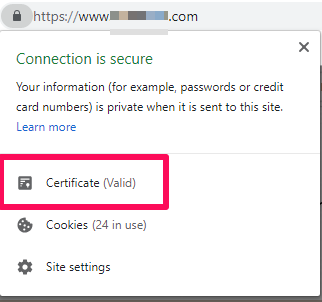
| Verify HTTPS and Secure Connection Details | Look for the padlock icon and "https://" in the URL. Click the padlock to view certificate details. | HTTPS shows encryption is active, but scam sites can also have valid certificates. It's necessary but not sufficient. |
| Check Domain Age and Registration History | Use WHOIS lookup tools to see when the domain was registered and who owns it. | Newly registered domains (days or weeks old) are more likely to be scam operations. Legitimate stores usually have longer histories. |
| Look for Warnings From Trusted Reputation Sources | Search the site URL on VirusTotal, browser security tools, or similar tools. | These databases flag sites linked to phishing, malware, or scam activity. No warnings don't guarantee safety, but active flags are serious. |
| Be Cautious with Trust Badges and Third-Party Seals | Look for badges like "Norton Secured" or "BBB Accredited" and verify they link to real verification pages. | Scam sites often display fake badges as static images. Real badges should be clickable and lead to verification on the badge provider's site. |
Safe Checkout and Payment Indicators to Look For
The checkout process is where scam sites cause the most damage. Knowing what a legitimate checkout should look like can help you avoid entering payment details on fraudulent pages.
- Secure and Consistent Checkout Pages: Legitimate checkouts maintain the same branding, design, and URL structure as the rest of the site. If clicking "Checkout" redirects you to a different domain or mismatched styling, stop and verify before continuing.
- Recognized and Reversible Payment Methods: Safe stores offer payment options with buyer protection, like credit cards, PayPal, or Apple Pay. Avoid sites that only accept wire transfers, cryptocurrency, gift cards, or direct bank payments.
- Clear Refund, Return, and Dispute Policies: Legitimate stores clearly explain return timeframes and conditions. If you can't find clear information about what happens if your order never arrives, treat that as a warning.
- No Requests for Direct Transfers or Crypto Payments: Scam stores often offer discounts for paying via crypto or bank transfer to make recovery impossible. Legitimate retailers don't push customers toward irreversible payment methods.
{{component-tips}}
Common Online Shopping Scams to Watch Out For
Understanding the most common types of shopping scams helps you recognize patterns before falling victim to them.
| Scam Type | How It Works | Warning Signs |
|---|---|---|
| Fake E-Commerce Stores Impersonating Real Brands | Scammers create websites that copy the look, logo, and products of legitimate retailers to collect payments for items they never ship. | Slight URL variations, prices significantly below market value, no verifiable contact information. |
| Phishing Sites Designed to Steal Payment Details | These sites mimic real checkout pages to capture credit card numbers, login credentials, and personal information. | Unexpected redirects during checkout, requests for unusual information, mismatched URLs. |
| Malicious Pages Triggering Hidden Downloads | Some scam sites install malware or spyware when visited, even without completing a purchase or clicking a download button. | Browser warnings, unexpected pop-ups, automatic file downloads without consent. |
| Social Engineering Tactics During Checkout | Scammers use fake chat support, urgent pop-ups, or phone calls to manipulate buyers into sharing additional information or making quick decisions. | Unsolicited contact during purchase, pressure to complete transactions immediately, requests for verification codes. |
Why Manual Website Safety Checks Aren't Enough Anymore
Checking websites manually used to be a reliable way to shop safely. Today, it's often not enough. Scammers move faster, use better tools, and rely on automation, making it harder for shoppers to spot danger before entering payment details.
1. Scam Sites Change Faster Than Reputation Databases
Many scam websites are created, used, and taken down within days. By the time a site is reported and added to a reputation database, the attackers have already collected payments and moved to a new domain. This makes manual checks less reliable, especially for newly promoted sites.
2. HTTPS and Visual Trust Signals Are Easy to Fake
A padlock icon and "https://" in the URL don't guarantee a site is legitimate. Free SSL certificates are available to anyone, including scammers. Similarly, trust badges can be copied and displayed as static images without any real verification behind them.
3. Most Shopping Decisions Happen in the Moment
When you see a great deal on social media or click through from a search result, you're often making quick decisions. Scam sites are designed to capitalize on this, creating urgency that discourages careful verification. By the time you think of checking a site's legitimacy, you may have already entered your payment information.
4. Always-On Protection Matters Across Desktop and Mobile
Shopping happens across devices, from desktop browsers to mobile apps and links shared in messages. Manual checks are easy to skip when you're on your phone or clicking through quickly. That's why always-on protection matters across desktop and mobile. When protection runs continuously, it can flag risky destinations earlier, especially when links come from ads, messages, or social feeds.
How did Guardio block this site? Our real-time protection and context-aware security mechanisms detected and blocked the scam immediately, preventing users from falling victim to an attack designed to steal personal and financial information. pic.twitter.com/hHlDldB1Fi
Guardio (@GuardioSecurity) January 1, 2025
Best Practices for Safer Online Purchases
Beyond checking individual websites, developing consistent habits can significantly reduce your risk when shopping online.
- Research Sellers Beyond Reviews and Ratings: Search for the store's name along with "scam," "review," or "complaint" on independent sites and forums. If a store has no presence outside its own website, that's worth noting.
- Use Unique Passwords and Enable Two-Factor Authentication: Use a unique password for each shopping site to limit damage from breaches. Enable 2FA where available for an extra layer of protection.
- Avoid Public Wi-Fi During Login or Checkout: Public Wi-Fi can be monitored by attackers intercepting sensitive data. Use a secure, private connection or a trusted VPN when entering payment details.
- Keep Devices and Security Tools Up to Date: Outdated browsers, operating systems, and security software may miss new threats. Regular updates ensure you have the latest protections against known vulnerabilities.
If you want a faster way to catch weak links, tools like Guardio can surface risky account settings (like missing 2FA) and warn you before you land on known scam destinations.
What to Do if You Already Bought From an Unsafe Website
If you've already made a purchase from a site you now suspect is fraudulent, acting quickly can limit the damage.
| Action | What to Do | Why It Matters |
|---|---|---|
| Secure Affected Accounts and Reset Credentials | Change passwords for any accounts where you used the same email or password. Enable two-factor authentication where possible. | Prevents attackers from accessing other accounts using credentials captured during the scam. |
| Monitor Payment Methods and Financial Activity | Check your credit card and bank statements for unauthorized charges. Contact your bank to report the suspicious transaction and request a chargeback if possible. | Early detection of fraudulent charges increases the chance of recovering funds. |
| Watch for Follow-Up Phishing or Identity Misuse | Be alert for emails, calls, or messages referencing your "order" or asking for additional information. Scammers often follow up to extract more data. | Information captured during checkout can be used for targeted phishing attacks. |
| Check for Data Exposure or Breach Alerts | Use breach monitoring tools to see if your email or personal information appears in known data leaks. Services like Have I Been Pwned can help. | Understanding what information may have been exposed helps you take appropriate protective steps. |
How Guardio Protects You From Unsafe Websites While Shopping Online
Guardio helps you check whether a website is safe before a risky click turns into stolen payment details, credential theft, or follow-up scams. It’s built for how shopping scams actually happen today, through search results, ads, social feeds, and links shared in messages.
- Real-Time Alerts Before Risky Sites Load: Guardio checks destinations as you encounter them and warns or blocks access to scam sites, fake stores, and deceptive checkout pages before you enter sensitive information.
- Protection Across Ads, Social Media, and Messages: Many shopping scams start with a link. Guardio alerts you when a destination looks dangerous, even if it comes from sponsored ads, social platforms, or shared messages rather than a traditional website visit.
- Scam Text Filtering and Phishing Email Alerts: On mobile, Guardio can filter scam text messages. When Gmail is connected for Email Security, Guardio can also flag phishing emails that slip into the inbox, helping stop fake receipts or shipping updates from leading to further compromise.
- Clear Visibility Into What Was Blocked and Why: Guardio provides transparency into blocked sites and risky destinations, helping you understand what was prevented and make safer decisions going forward.
Rather than relying on shoppers to manually investigate every URL, Guardio focuses on real-time detection and alerts, stepping in at the moment people are most likely to get tricked - right before login or checkout.
Conclusion
Checking websites carefully before buying is still important, but in 2026, it's no longer enough on its own. Scam stores change quickly, fake checkouts look convincing, and most purchases happen in the moment before there's time to verify anything.
Having Guardio adds protection. By combining smart shopping habits with proactive, real-time defense, you're far better equipped to avoid fake stores, protect your payment information, and shop with confidence even as online threats continue to evolve.
{{component-cta-custom}}
FAQs
What should I do if a website is asking for too much personal info?
If a shopping site asks for your birthdate or ID number, that’s a red flag - not a receipt.
- Stick to the basics - a real store only needs shipping and payment info.
- Avoid “account required” checkouts on unfamiliar sites.
- Look for sneaky opt-ins that sign you up for spam or future phishing attacks.
- Use browser tools like Guardio to flag overreaching data requests.
You can also use Guardio to review what sites were blocked and why.
How can I spot fake trust badges or security seals?
Scam sites often display phony badges to look legit, but they're just images.
- Click the badge: if it’s real, it should link to a validation page.
- Cross-check seals with the provider’s own site (e.g., Norton, BBB).
- Don’t trust images alone, scammers can copy them easily.
- Guardio flags scam pages, including fake badge usage, before you check out.
For deeper insights on shady checkout tricks, read how Guardio defends you from malicious pages and pop-ups.
What are the latest scam tactics targeting online shoppers?
In 2026, fake stores use AI to look more real than ever, but Guardio is learning faster.
- Watch for deepfake logos, cloned designs, and copied customer reviews.
- Be wary of countdown timers or “only 3 left” claims on unfamiliar sites.
- Use WHOIS tools to check domain age. New can mean risky.
- Let Guardio block pop-up stores that disappear before the refund window closes.
See Guardio’s guide to recognizing and blocking high-risk scam activity in real time.
How does Guardio protect me from scam shopping sites?
Guardio blocks fake stores before they can steal your info, even from search, ads, or texts.
- Real-time protection flags suspicious checkouts before you enter payment info.
- Mobile filtering stops scam links from social DMs or texts on iOS.
- Browser alerts pop up before dangerous redirects or site impersonations.
- Visibility into blocked threats helps you learn and avoid repeat risks.
Explore everything Guardio does to secure your browser and your inbox.
Can Guardio help after I already bought from a fake store?
Guardio can’t recover lost funds or issue refunds, but it can help you secure your accounts and reduce further risk after the incident.
- Guardio alerts you if your email or personal information appears in data leaks linked to scam activity.
- It can warn you about phishing follow-ups or scam emails that often arrive after a fake purchase.
- If you clicked suspicious links or downloads, Guardio helps identify and remove risky extensions or unsafe browsing behavior.
- Guardio also highlights weak account settings, like reused passwords or missing two-factor authentication, so you can lock things down quickly.
- If you’re unsure what to do next, Guardio offers 24/7 support to help guide you through securing your accounts and preventing additional damage.
Learn how to protect your identity post-purchase and stop future threats.
 Safe Browsing
How to Stay Safe on Public WiFi and Why Hackers Love It