Googled a Mac Storage Fix Lately? Scammers May Have Already Topped the Results



Key Takeaways
Here is what this campaign looks like from end to end, and why each stage matters.
- Scammers purchase Google Ads for common Mac troubleshooting queries, placing malicious results at the very top of search pages.
- Instead of linking to suspicious domains, these ads redirect to pages hosted on reputable platforms like Grammarly, Medium, and Kimi.com.
- The malicious pages mimic an AI chatbot that instructs users to copy-paste Terminal commands; those commands install infostealers.
- Infostealers operate silently. They do not crash your system or display pop-ups; they extract sensitive data in the background.
- Checking the URL bar alone no longer guarantees safety. A layered, proactive approach to online protection is now essential.
You search Google for a simple Mac fix. The top result looks legitimate; it leads to a page on Grammarly, Medium, or another well-known platform. A friendly AI chatbot walks you through a solution and asks you to paste a command into Terminal. Within seconds, malware is silently harvesting your passwords, credit card details, and crypto wallets.
This is a real, active campaign. And it works precisely because every element in the chain looks safe.
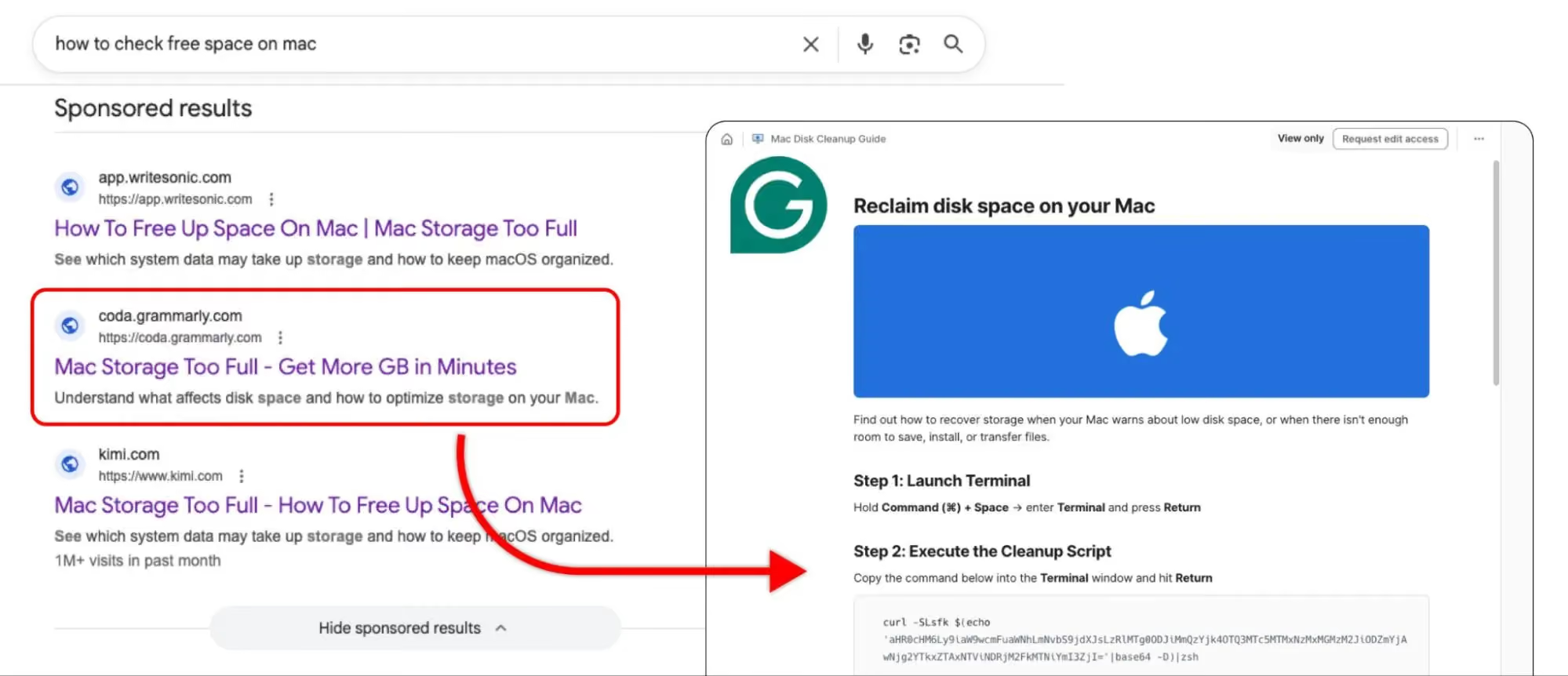
A new wave of malvertising targets Mac users by combining paid Google Ads, trusted third-party domains, and fake AI chat interfaces into a seamless deception pipeline. The attack never triggers your browser's security warnings, and it bypasses the instinct most of us rely on: checking the URL bar.
Let's break down how the trick works, why traditional caution falls short, and what you can do to protect yourself.
Inside the Trust Pipeline: How the Attack Unfolds
This campaign succeeds because it stacks four layers of perceived trust on top of each other. Each layer reinforces the next, making the final payload almost invisible.
1. The Lure; Weaponized Google Ads
The attackers bid on high-intent troubleshooting keywords like "sound not working on Mac" or "check free space on Mac." These search terms attract users who are already frustrated and primed to quickly follow instructions.
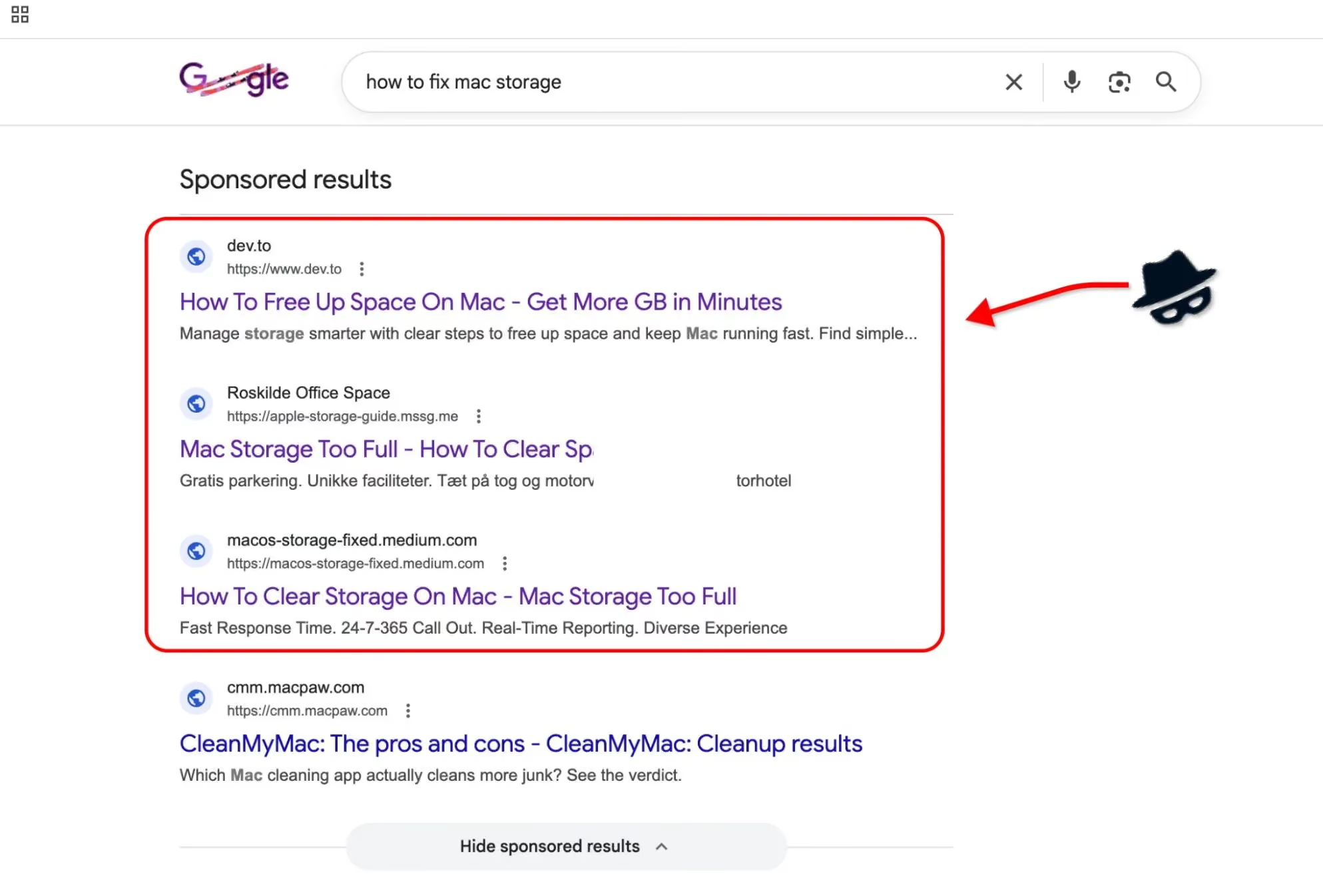
Because these results appear as sponsored listings at the top of Google's search page, they sit above organic results, the exact spot most users click first. Google's own ad badge is easy to overlook when you are focused on solving a problem.
2. The Legitimacy Shield; Trusted Domains
Here is where the attack diverges from traditional phishing: instead of navigating you to a suspicious site like fix-your-mac-now.com, the ad redirects you to a page hosted on a well-known, high-authority domain.
These high-authority sites share a common trait: they let anyone publish content with minimal upfront review. Attackers exploit this by publishing their trap pages directly on these sites. The result: your browser shows a green padlock, the domain is one you recognize, and most security filters wave it through without a second look.
This single step dismantles the assumption that a recognizable domain equals safe content. The address bar checks out; the page behind it does not.
3. The Social Engineering: A Fake AI Assistant
The malicious pages don't rely on a single deception format. Some present a polished chat interface designed to mimic a modern AI assistant. It greets you, acknowledges your problem, and walks you through a step-by-step "fix." The conversational tone feels both helpful and authoritative. But the AI chat is only one variant.
A simpler, and arguably more convincing, version skips the chatbot entirely: a static page cloned directly from Apple's official support site. Same layout, same typography, same reassuring Apple aesthetic. No interaction required; just a clean page that looks like it belongs on apple.com, complete with a Terminal command presented as a routine troubleshooting step.
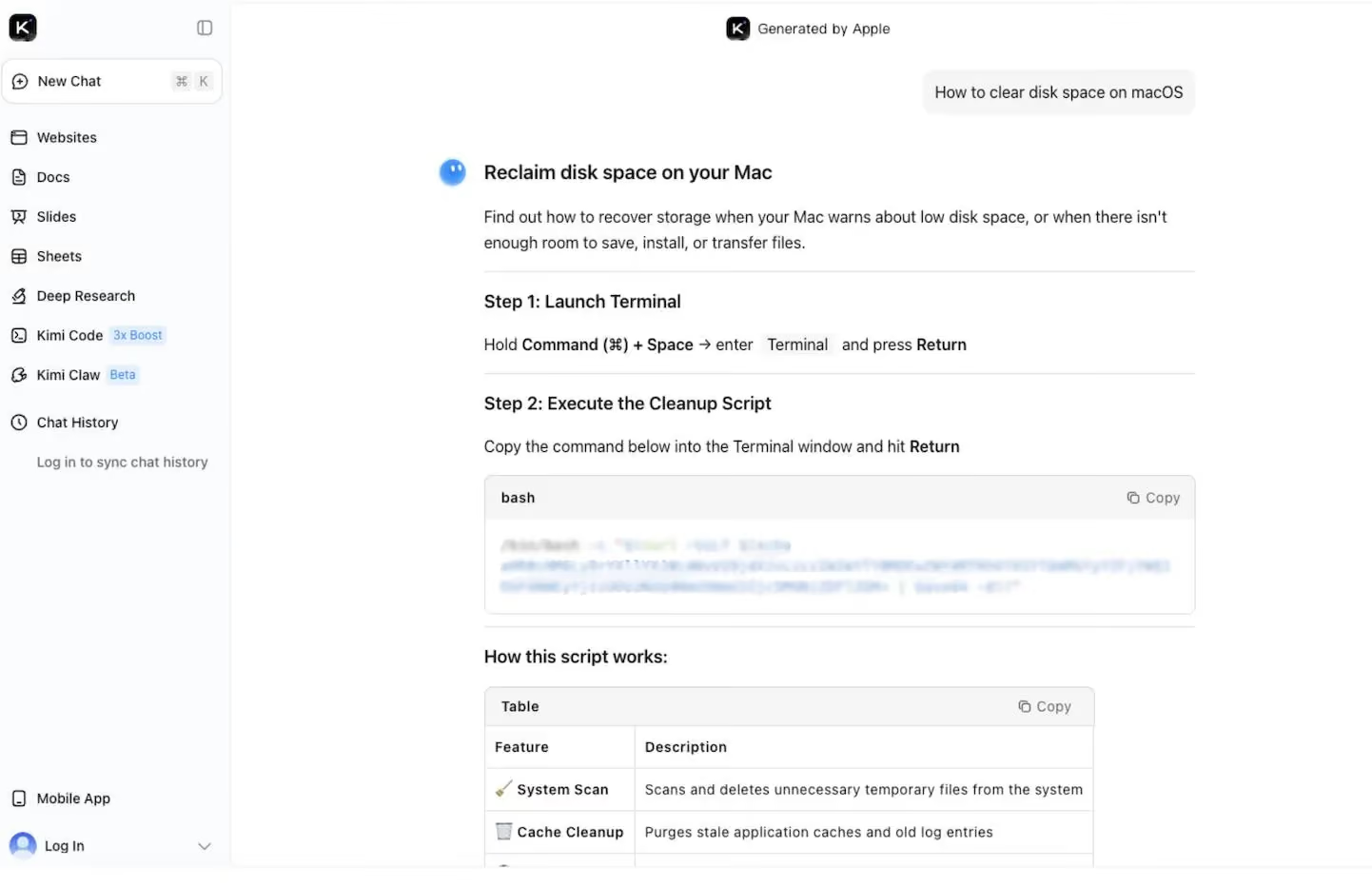
Both formats share the same critical moment: the instruction to open Terminal and paste a command. To a non-technical user, that string of text is opaque because there is no visual signal that separates a legitimate diagnostic command from one that silently installs malware. Whether the instruction comes from a friendly chatbot or a page that mirrors Apple's support docs, the psychological effect is identical: the interface looks trustworthy, so the command must be safe.
The payload waits one step further, and it's designed to be invisible once it lands.
4. The Payload: Silent Infostealers
Once you execute the Terminal command, an infostealer installs itself on your Mac. Unlike traditional viruses that corrupt files or display ransom notes, infostealers are designed to be invisible. They run quietly in the background and target high-value data:
- Saved passwords from browsers and password managers
- Credit card numbers stored in autofill
- Cryptocurrency wallet credentials and seed phrases
- Session cookies that let attackers log into your accounts without needing your password
You will not see a warning. Your Mac will not slow down. The malware collects what it needs and transmits the data to the attacker's servers. By the time you notice unauthorized transactions or account lockouts, the damage is already done.
This distinction matters: infostealers do not break your computer. They steal the life you live inside it.
Why Traditional Advice No Longer Holds Up
For years, the standard guidance was straightforward: avoid shady-looking URLs, do not click on links from unknown senders, and watch for typos in domain names. These habits still help, but this campaign exposes their limits.
Reputable domains now host hostile content. Open publishing platforms moderate at scale, but attackers move faster than review queues. A page can accumulate thousands of views before moderation catches up. Microsoft experts documented this broader pattern in early 2026, observing a rapid expansion of macOS-targeted infostealer campaigns that leverage platform abuse and social engineering.
AI interfaces rewire how we evaluate risk. A chatbot format triggers a conversational mental model. Users engage with it as a dialogue, not as a document to scrutinize. That shift in framing lowers the guard at the exact moment the attack needs compliance.
"Sponsored" does not mean "verified." Google Ads undergo automated policy checks, but determined attackers rotate creatives and landing pages to stay ahead of enforcement. A paid placement at the top of your search results carries no guarantee of safety.
The core lesson: online trust operates in layers, and each layer can be exploited independently. A clean domain, a polished interface, and a paid ad placement can all be true at the same time the content behind them is malicious.
How to Stay Safe: Practical Steps You Can Take Right Now
Protecting yourself from this type of attack requires updating a few habits and adding a proactive layer of defense.
1. Treat "Sponsored" Search Results with Extra Caution
Sponsored results sit at the top of your search page because someone paid for that placement. Before clicking, scroll past the ads and check the organic results. If the same solution appears from a verified source (like Apple's support page), start there instead.
2. Never Copy-Paste Terminal Commands from a Website
This is the single most important takeaway. Terminal commands execute with your user privileges and can download, install, and run software without any additional confirmation. No matter how reputable the domain, pasting commands you do not fully understand into Terminal is the digital equivalent of handing your house keys to a stranger.
If a website suggests a Terminal command as a fix, verify it independently. Search for the exact command on developer forums, Apple's documentation, or well-known tech communities before running it.
3. Understand That Trusted Platforms Host Unvetted Content
Medium, Grammarly's community pages, and similar platforms are open publishing environments. The brand name in the URL bar reflects the platform's reputation, not the reliability of every individual page on it. Apply the same critical thinking you would use on any other website.
It's worth noting that platforms are responding: Grammarly (now operating under the Superhuman brand) confirmed to us that it is actively removing and flagging accounts exploiting its platform for these attacks. Even so, staying alert on your end remains an important part of the equation.
4. Add a Proactive Security Layer
The steps above sharpen your judgment, but no one can stay vigilant around the clock. That is where a dedicated security layer closes the gap.
Guardio is built around proactive, AI-driven threat detection that works before damage occurs, not after. Here is how its core pillars map directly to this type of attack:
- Real-time phishing and scam blocking. Guardio's browser extension analyzes pages as you load them, flagging social engineering patterns and malicious scripts even when the hosting domain is legitimate.
- Sponsored ad protection. Guardio scans search-result ads and warns you before you click through to a malicious website, exactly the entry point this campaign exploits.
- Identity and data leak monitoring. If an infostealer does compromise credentials elsewhere, Guardio's dark web monitoring alerts you when your email, passwords, or financial data surface in known breach databases, so you can act before attackers do.
- Cross-device, cross-platform coverage. Protection extends across browsers and devices from a single dashboard, giving you a unified view of your security posture without juggling multiple tools.
Unlike traditional antivirus software that detects threats after they execute, Guardio intercepts them at the point of interaction; whether that interaction is a Google Ad, a deceptive chatbot, or a disguised download link.
Staying One Step Ahead
Malvertising campaigns like this one succeed because they exploit the gap between how we think online trust works and how it actually works. A familiar domain, a polished interface, and a conversational tone combine to override the caution that would normally protect you.
The good news: awareness is your strongest defense. Now that you understand how the trust pipeline operates, you can recognize the warning signs before reaching the payload stage. Pair that awareness with a proactive tool like Guardio, and you add a safety net that catches the threats you might miss.
Stay curious, stay cautious, and remember: the smartest scams are the ones that never look like scams at all.
{{component-cta-custom}}
FAQs