How AI Detects Dangerous URLs in Real Time for Safer Online Experiences



Key Takeaways
- Massive Scale of URL-Based Threats: According to a 2026 Consumer Federation of America report, online scams cost Americans an estimated $119 billion every year which is more than seven times the losses officially reported to the FBI’s IC3 underscoring the true, largely hidden scale of the threat.
- Static Defenses Have Blind Spots: Traditional blocklists and reputation databases often miss newly created scam domains and previously unseen phishing URLs, especially early in a campaign. AI-driven analysis helps close that gap by evaluating suspicious links before they are widely reported.
- AI Enables Real-Time Detection: Machine learning models analyze URL patterns, domain age, redirect chains, and page behavior to flag threats instantly, without waiting for manual reporting or database updates.
- Multi-Channel Threat Distribution: Dangerous URLs reach users through phishing emails, scam texts, sponsored search ads, social media posts, and shortened links, requiring protection that spans all entry points.
- Guardio Provides Real-Time, Cross-Device Protection: Guardio helps stop phishing, scams, and malicious destinations before they turn into account compromise, fraud, or downloads, with protection designed for the links people encounter across devices, email, texts, search results, ads, and everyday online activity.
Every phishing email, scam text, and malicious ad has one thing in common: a dangerous URL designed to look safe. Clicking one can expose login credentials, trigger malware downloads, or redirect users to fraudulent checkout pages that harvest payment information. Traditional security tools that rely on static blocklists and known signatures are no longer fast enough to keep up. Scam domains often go live and disappear within hours, well before they appear on any blacklist.
This is where AI-powered URL detection changes the equation. By analyzing link structures, domain behavior, redirect chains, and page content in real time, AI systems can identify and block dangerous URLs the moment a user encounters them, even if the link has never been flagged before.
This guide breaks down how these systems work, what signals they use, where dangerous URLs originate, and how tools like Guardio apply real-time detection to help protect people across devices, accounts, messages, search results, ads, and other common online entry points.
{{component-cta-custom}}
What Is Real-Time AI-Based Dangerous URL Detection?
Real-time AI-based dangerous URL detection is a security approach that uses machine learning models to evaluate web links the moment a user encounters them. Rather than checking a URL against a static list of known threats, these systems analyze the structural and behavioral characteristics of the link itself, including domain attributes, character patterns, redirect behavior, and the content of the destination page.
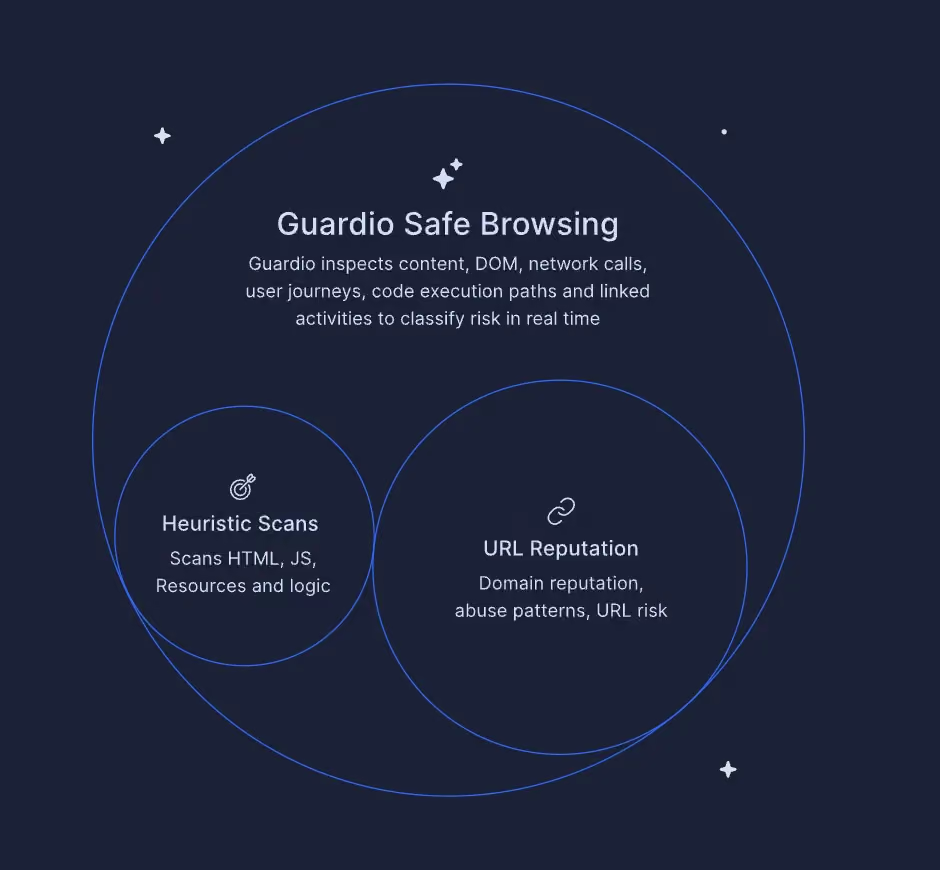
The core advantage of this approach is speed. Traditional detection relies on threat intelligence feeds that are updated periodically, meaning a brand-new phishing page can operate freely until it gets reported and added to a blocklist. AI-based systems eliminate this gap by scoring URLs in real time based on learned patterns from large volumes of previously identified threats and suspicious behaviors. If a link displays characteristics associated with phishing, scam activity, or malware delivery, it can be flagged or blocked before the user ever reaches the page.
This capability has become critical as attackers increasingly use short-lived domains, multi-step redirects, and AI-generated storefronts designed to evade signature-based detection.
Why Real-Time AI URL Detection Matters
The speed at which new phishing URLs appear and disappear makes traditional detection methods increasingly unreliable. Real-time AI-based URL detection addresses this gap by evaluating threats as they emerge, not after they have already caused damage. Here is why this capability matters across three critical areas:
- Protecting Users From Emerging and Zero-Day Threats: Zero-day phishing URLs are links that have never appeared in any threat database. These pages often live for only a few hours before being taken down and replaced with a new domain. Real-time AI detection is designed to catch these ephemeral threats during their brief operational window, before any blocklist can be updated.
- Reducing Phishing, Scam, and Malware Risks: Real-time URL detection reduces risks by intercepting malicious links at the point of interaction, whether in an email inbox, a text message, or a browser search result. For a deeper understanding of how phishing scams operate, recognizing the tactics behind them strengthens your ability to spot threats that automated tools might still be learning to catch.
- Overcoming Limitations of Traditional Blocklists: Static blocklists depend on known indicators of compromise. Combining multiple databases helps, but new domains registered minutes before an attack will not appear in any list. AI detection fills this gap by evaluating the URL's own characteristics rather than relying exclusively on whether it has been reported before.
Together, these factors make real-time AI detection not just an upgrade over legacy tools, but a fundamental shift in how URL-based threats are identified and neutralized before they reach end users.
Where Dangerous URLs Come From in Real-World Attacks
Dangerous URLs do not appear out of nowhere. They are distributed through carefully chosen channels designed to reach users at moments when they are most likely to click without thinking. Understanding where these links originate is the first step toward recognizing them before they cause harm.
1. Phishing Links in Emails and Messages: Email remains one of the most common delivery channels for malicious URLs, alongside texts, ads, search results, and social platforms. Attackers craft messages that impersonate banks, shipping companies, or internal IT departments and embed links to credential-harvesting pages. These targeted phishing campaigns are becoming increasingly personalized through AI, making them harder to distinguish from legitimate communications.
2. Malicious Ads and Search Results: Scammers purchase sponsored ad placements on search engines to push fake websites to the top of search results. These ads often target users searching for discount codes, software downloads, or customer support numbers. On mobile devices, where ad labels are less prominent, distinguishing paid scam results from organic listings is particularly difficult. This tactic is closely related to the fake discount scam model, where fraudulent ads drive traffic to clone storefronts.
3. Fake Websites and Lookalike Domains: Clone websites use the same logos, product images, and page layouts as legitimate brands while operating on slightly altered domain names. Common tactics include adding hyphens, swapping characters, or using unfamiliar top-level domains such as .shop, .buzz, or .top.
4. Social Media and Shortened Links: Dangerous URLs circulate widely through social media posts, direct messages, and profile bios. Shortened links from services like bit.ly or t.co obscure the true destination, making it impossible to assess safety from the link text alone. Once clicked, these can route through multiple redirect chains before landing on the actual phishing page.
What Happens When You Click a Dangerous URL
Clicking a dangerous URL rarely ends with just a single unwanted page. Each click can trigger a chain of consequences that extends well beyond the initial interaction. The table below outlines the most common outcomes and why each poses a serious risk:
Why Traditional URL Detection Methods Fall Short
Traditional URL detection was built for a slower threat landscape. When phishing domains lasted weeks and attack patterns were predictable, blocklists and signature-based filters offered reasonable protection. But today's attackers move faster than these systems can update, exploiting the gap between when a threat goes live and when it gets flagged. Here is where legacy approaches fall short:
Delays in Blocklist and Reputation Updates
Blocklist-based systems depend on a cycle of discovery, verification, and publication. A phishing URL must first be identified, reported, reviewed, and then distributed across threat intelligence feeds before it can be blocked. This process can take hours or even days. Given that many scam domains are active for less than 24 hours, a significant number of threats operate and extract data well within the window before blocklist updates reach end-user devices.
Inability to Detect New and Obfuscated Threats
Attackers routinely use obfuscation techniques to evade pattern-matching filters. These include encoding URLs, nesting redirects through legitimate platforms, using URL shorteners, and dynamically generating page content based on visitor attributes.
IBM’s 2025 X-Force Threat Intelligence Index highlighted how attackers are shifting delivery tactics to evade older defenses. IBM reported a 70% decline in ZIP attachments and a 45% decline in RAR attachments, while malicious URLs and PDF-based delivery increased, reflecting a move toward stealthier phishing and credential-theft methods.
Lack of Contextual and Behavioral Analysis
Traditional tools evaluate URLs in isolation, checking the domain name against a database without considering how the link was delivered, what the destination page contains, or how the site behaves after the user arrives. This creates blind spots for attacks that use clean-looking domains, legitimate hosting infrastructure, or multi-step redirect chains that only reveal malicious content at the final destination. Understanding these limitations is why experts increasingly recommend real-time protection over static scanning tools.
How AI Detects Dangerous URLs in Real Time
AI-based URL detection works by analyzing multiple dimensions of a link simultaneously, rather than relying on a single check against a known threat list. From the structure of the URL itself to the behavior of the destination page, these systems evaluate risk across several layers in milliseconds. Below are the four core techniques that power real-time AI detection.
- Pattern Recognition in URL Structures: AI models analyze the structural composition of a URL, including character frequency, string length, the presence of unusual subdomains, and deviations from typical URL formatting patterns. Phishing URLs often contain random character strings, excessive hyphens, or brand names embedded in unusual positions within the link. Machine learning classifiers trained on large sets of labeled URLs can detect these structural anomalies with high accuracy.
- Domain Reputation and Behavioral Analysis: Beyond the URL string itself, AI evaluates the domain’s registration age, hosting provider, DNS records, and historical behavior. Newly registered domains with no prior web presence that suddenly receive high traffic are flagged as high risk. Behavioral signals like rapid IP changes, association with known malicious infrastructure, and hosting patterns consistent with phishing kits all feed into the model’s risk assessment.
- Detection of Obfuscation and Hidden Redirects: AI systems trace the full redirect chain of a URL, following multi-step redirects through legitimate platforms, shortened links, and encoded paths to identify the final destination. This capability is critical because many phishing attacks chain through legitimate services, URL shorteners, and trusted platforms before landing on the final malicious destination. The AI evaluates each hop in the chain and assesses the endpoint independently.
- Real-Time Risk Scoring Using Multiple Signals: Rather than making a binary safe-or-dangerous determination, AI models generate a composite risk score based on weighted signals including URL structure, domain reputation, page content analysis, SSL certificate attributes, and behavioral patterns. This scoring enables nuanced decisions, allowing the system to flag borderline cases for user warnings while outright blocking URLs that exceed a high-risk threshold.
Key Signals AI Uses to Identify Malicious URLs
Every malicious URL leaves behind signals, some visible in the link itself, others hidden in the behavior of the page it leads to. AI models are trained to pick up on these signals simultaneously, weighing each one against patterns drawn from millions of previously analyzed threats. The table below breaks down the key signal categories, what AI looks for within each, and why they matter for accurate detection.
{{component-tips}}
Real-World Use Cases of AI URL Detection
AI-powered URL detection is already being applied across a range of real-world scenarios where speed, scale, and accuracy determine whether a threat is stopped or succeeds.
Protecting From Phishing and Scam Links
To intercept phishing and scam links distributed through email, SMS, and social media, AI URL detection is widely used. When a user clicks a link in an email that routes to a newly registered domain mimicking a banking login page, AI systems evaluate the URL structure, domain registration data, and page content in real time. This allows the system to block the threat even if the domain was created minutes earlier and has not yet appeared on any blocklist.
Securing Remote Work and Distributed Teams
Remote and hybrid work environments expand the attack surface significantly. Employees access corporate resources from personal devices, home networks, and public Wi-Fi, often outside the protection of enterprise firewalls. AI-powered URL detection applied at the browser level provides a portable security layer that travels with the user, flagging malicious links regardless of the network or device being used.
Preventing Fraud Across Browsing and Online Transactions
Fake checkout pages and fraudulent e-commerce sites represent a growing category of URL-based threats. AI detection systems analyze the behavioral fingerprint of these pages, comparing checkout flows, payment form structures, and page elements against patterns associated with known scam operations. This is particularly valuable during peak shopping periods when scam site creation surges.
Real-Time URL Protection vs Manual URL Checking Tools
Manual URL checkers serve a purpose, but they require the user to take action before every click. In a world where dangerous links arrive through email, texts, ads, and social feeds simultaneously, that model leaves too many gaps. Here is how the two approaches compare.
- Reactive Scanning vs Proactive Protection: Manual URL checkers require users to copy and paste a link into a scanning tool before visiting the page. Protection is only active when the user remembers to check. Real-time AI protection, by contrast, operates automatically in the background, evaluating every URL as it is encountered across browsing, email, and messaging without any user action required.
- Limitations of One-Time URL Checkers: These tools provide a snapshot assessment based on current database entries at the moment of the scan. If a URL has not yet been reported or was created after the last database update, it may be classified as safe even if it is malicious. AI-based systems go further by using behavioral and structural analysis to assess URLs that have never been seen before.
- Importance of Continuous, Always-On Detection: Coverage gaps exist whenever a user forgets to scan a link or encounters a threat through a channel not covered by a manual tool. Always-on AI detection provides uninterrupted protection across all channels, including email links, search ads, social media, and SMS, with no manual steps required.
For consistent protection that does not depend on user behavior, real-time AI detection is the more reliable approach.
Best Practices for Implementing Real-Time URL Protection
Deploying AI-based URL detection is most effective when it is supported by the right infrastructure, data flows, and coverage strategy. The following practices help maximize detection accuracy and minimize blind spots.
How Guardio Detects and Blocks Dangerous URLs in Real Time
Awareness and best practices are essential, but the volume and sophistication of URL-based threats make manual vigilance alone insufficient. Guardio adds an automated, AI-driven defense layer that works continuously in the background to intercept threats that human caution and static tools may miss.
- Real-Time Detection of Phishing, Scam, and Malicious Sites: Guardio evaluates URLs as users visit them, using AI-based analysis that goes beyond static blocklists. It assesses domain behavior, page content, and structural signals to identify phishing and scam pages in real time, including newly created domains that have not yet been reported to any threat database.
- Blocking Harmful Pages Before User Interaction: When Guardio identifies a dangerous URL, it blocks access to the page before the user can enter credentials, payment information, or personal data. This preemptive approach stops threats at the point of click, not after the damage is done.
- Protection Across Common Online Entry Points: Scam operators push dangerous URLs through email, texts, ads, search results, and other high-risk touchpoints. Guardio is built to help detect risky destinations and warn or block before a suspicious link turns into a compromised account, payment scam, or harmful download.
- Detection of Lookalike Domains and Impersonation Attempts: Guardio identifies clone websites and typosquatting domains that impersonate trusted brands. By analyzing domain patterns, page context, code, behavior, and impersonation signals, Guardio helps identify fraudulent destinations designed to bypass casual visual inspection.
- Alerts for Identity Risks and Data Exposure: Beyond blocking dangerous URLs, Guardio monitors for exposed credentials and data leaks tied to user email addresses and phone numbers. If a user’s information appears in a known breach, Guardio sends alerts to take immediate corrective action, such as changing passwords or enabling stronger authentication.
Conclusion
Dangerous URLs remain the primary delivery mechanism for phishing attacks, credential theft, malware distribution, and online fraud. As attackers increasingly use AI-generated content, short-lived domains, and multi-step redirect chains, the limitations of traditional blocklist-based defenses become more apparent with each passing quarter.
AI-powered URL detection addresses these gaps by evaluating links in real time based on structural patterns, domain behavior, redirect chains, and page-level content analysis. This approach catches threats that have never been reported, flagging zero-day phishing pages and newly minted scam domains at the moment of user interaction.
Combining this technology with practical habits, such as cross-checking unfamiliar links, using credit cards for traceable payments, and paying attention to post-click page behavior, creates a strong, layered defense. For people who want proactive protection that works across devices and the online entry points they actually use, Guardio helps stop dangerous links, scam pages, impersonation attempts, and related identity risks before they turn into account compromise, fraud, or malware exposure.
{{component-cta-custom}}
FAQs
How can I protect my family from accidentally clicking dangerous links?
The simplest way is to combine awareness with automatic protection that blocks risky links before they load.
- Turn on browser protection tools that scan links in real time, especially on shared devices
- Teach basic red flags like urgent messages, fake prizes, or login requests out of context
- Avoid clicking links in texts or DMs, and go directly to the official website instead
- Use separate profiles or accounts for kids to limit exposure to risky content
For a deeper breakdown of safe habits, explore these online safety tips.
What should I do if I clicked a suspicious link by mistake?
Act quickly to reduce risk and prevent further damage.
- Close the page immediately; don’t interact with pop-ups or forms
- Change passwords for any accounts you may have exposed
- Run a security scan or check extensions for anything unfamiliar
- Monitor your accounts for unusual activity or login alerts
If you’re unsure what steps to take next, follow this guide on what to do after clicking a phishing link.
How do scammers make malicious links look legitimate?
They rely on visual tricks and timing to make fake links feel trustworthy.
- Use lookalike domains (like paypaI.com instead of paypal.com)
- Hide links behind buttons or shortened URLs to obscure the destination
- Mimic real brands perfectly with cloned websites and logos
- Exploit urgency like “account locked” or “limited-time offer” messages
To better recognize these tactics, read more about how to identify phishing scams.
How does Guardio stop dangerous URLs before they load?
Guardio uses AI to analyze links and block threats in real time, before you interact with them.
- Scans URL structure and behavior instantly when you click
- Follows redirect chains to detect hidden malicious destinations
- Blocks harmful pages automatically before they open
- Continuously learns from new threats across all users
You can see how this works in practice in Guardio’s approach to browser protection.
Can Guardio protect me outside my browser, like on mobile or email?
Yes, Guardio extends protection across multiple entry points where dangerous links appear.
- Mobile app blocks malicious sites across your phone’s browsers
- Email security flags phishing messages that slip past spam filters
- Text message filtering removes scam SMS automatically
- Identity monitoring alerts you if your data is exposed after a breach
To understand the full coverage, check out how Guardio works across devices in this feature overview.