Coinbase Scam Emails: How to Recognize & Avoid Them


Key Takeaways
- Coinbase scam emails are designed to steal your login credentials, personal information, or crypto by pretending to be official Coinbase messages.
- Common scams include fake verification requests, urgent security alerts, giveaway offers, technical support impersonation, and SIM swap phishing attempts.
- Always verify sender addresses, hover over links, watch for urgent wording, and avoid attachments or QR codes from suspicious emails.
- Use strong, unique passwords, enable two-factor authentication or hardware keys, and keep your devices and apps updated.
- If you click a scam email, act quickly: lock your account, reset passwords, check connected apps, and report the incident to Coinbase and authorities.
- With Guardio, you gain proactive protection that blocks phishing pages, detects exposed credentials, and highlights weak spots across your accounts before attackers can exploit them.
Scam emails impersonating Coinbase have rapidly become one of the most common tactics cybercriminals use to steal money, logins, and personal details from unsuspecting crypto users. At first glance, these phishing emails often look legitimate, complete with official logos, urgent warnings about account security, or enticing offers that pressure you to act immediately. Because they mimic Coinbase’s genuine communication style so closely, many users don’t realize they’ve been duped until the damage is already done.
If you’re a Coinbase user, understanding how these scams work - and the red flags to look out for - is critical to protecting your assets. In this guide, we’ll explore the most widespread types of Coinbase scam emails, highlight the telltale signs of a phishing attempt, and walk you through the steps to take if you accidentally engage with one. You’ll also learn practical best practices to strengthen your defenses and how advanced tools like Guardio can provide an added layer of proactive protection against evolving crypto threats.
{{component-cta-custom}}
What are Coinbase Scam Emails?
Coinbase scam emails are phishing messages crafted by scammers to steal sensitive details like your login, passwords, or even direct access to your wallet. They often copy Coinbase’s branding, use professional designs, and send alarming messages like “suspicious login attempt” or “verify your account.” These emails look real enough to trick even careful users, making them one of the biggest threats to crypto security.
Coinbase has faced security incidents in the past, including when attackers targeted and bribed support agents, and stole personal details such as names, phone numbers, and IDs. While no passwords or private keys were exposed, criminals can now use this stolen data to create more personalized and convincing scam emails.
We’re already seeing a rise in scam texts impersonating Coinbase - no surprise, since the apparently the hackers had access to customer data as far back as January
Guardio (@GuardioSecurity) May 19, 2025
Types of Coinbase Scam Emails
Coinbase scam emails come in many forms, each designed to trick users in a different way. Recognizing these variations early can help you spot scams quickly and avoid becoming a victim. Here are the most common types of Coinbase scam emails:
1. Fake Verification Requests
Scammers may ask you to “verify” your account by entering login details or personal information. These messages often claim that failing to verify will lock your account immediately.
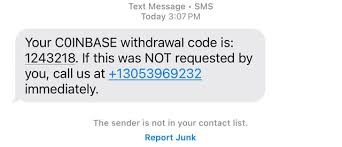
If you observe carefully, it is C0INBASE and not COINBASE. There is a zero in place of the letter ‘o’.
2. Security Alerts with “Urgent Action Required”
These emails warn of suspicious activity on your account and push you to act fast. The urgency is designed to trigger panic, pushing you into unsafe clicks without time to verify.
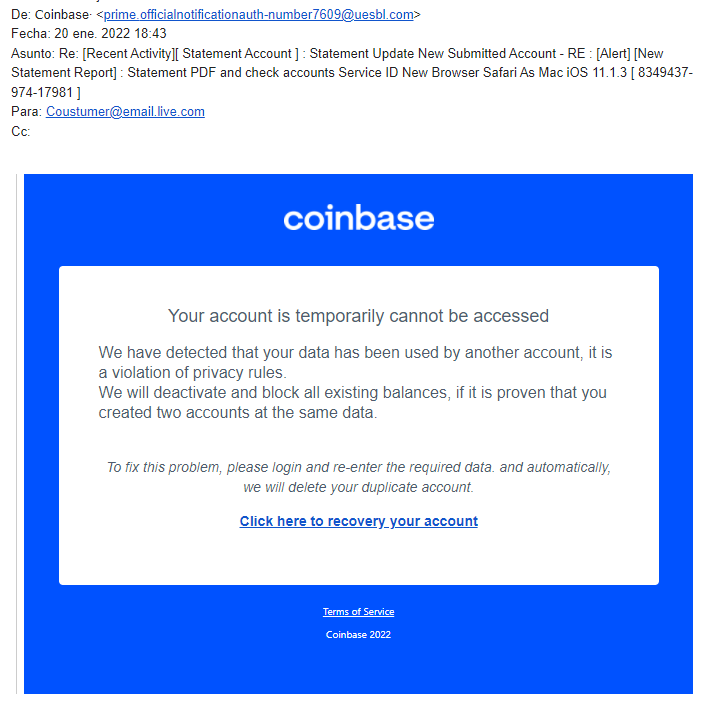
A closer look reveals a grammar error - “Click here to recovery your account” instead of “recover.” Genuine Coinbase security alerts should always be verified by logging into your account directly, not through email links.
3. Giveaway or “Double Your Crypto” Offers
Any email promising free crypto or claiming to ‘double your deposit’ is a scam. Coinbase will never run such promotions by email. These offers only lure users with unrealistic rewards to steal their funds.

Legitimate promotions are only announced on Coinbase’s official website or verified channels.
4. Technical Support Impersonation
Fraudsters may pose as Coinbase support agents, offering help to “fix problems.” They ask for sensitive details, which they later use to hack accounts. Genuine support will never request your private keys or full passwords.
5. Device Confirmation or Login Attempt Notices
Scammers may send fake alerts about new devices or login attempts, prompting you to click links that steal your credentials. Always verify such alerts by logging in directly rather than following the message link.
6. Fake Tax or Compliance Warnings
Emails claiming you owe taxes or must comply with regulations can trick you into sharing personal or financial info. Official tax communications from Coinbase are always accessible within your account dashboard.
7. SIM Swap Scams Linked to Phishing
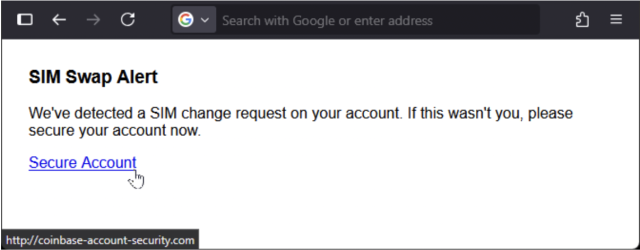
Some emails are part of a larger SIM swap attack. Scammers try to steal your phone number to bypass 2FA and gain access to your crypto accounts. Protect your number by enabling carrier-level security and using hardware-based 2FA.
How to Recognize Coinbase Scam Emails
A clear way to spot scam emails is to check for common warning signs. The table below summarizes each tip with insights:
| Tip | How to Spot | Why It Matters |
|---|---|---|
| Verify Sender Addresses Carefully | Check the email domain (e.g., coinbase.com) and look for subtle misspellings like c0inbase.com | Scammers often use fake addresses that look real at a glance |
| Hover Over Links Before Clicking | Place your cursor over links to see the real URL | Malicious links often hide the true destination |
| Watch For Urgent or Threatening Wording | Phrases like “Act now or your account will be locked” | Creates panic and forces quick, unsafe actions |
| Spot Spelling or Grammar Mistakes | Look for typos or awkward phrasing | Real Coinbase emails are professionally written |
| Ignore Requests for Logins or Wallet Access | Coinbase will never ask for your password or private keys via email | Protects sensitive account information |
| Avoid Attachments, QR Codes, or Downloads | Emails may include malware hidden in attachments or codes | Opening them can infect your device or steal data |
| Trust Only Official Coinbase Communication Channels | Verify alerts via coinbase.com or the official app | Scammers rely on fake emails to bypass your defenses |
These tips can serve as a quick reference whenever you receive a suspicious email, helping you stay one step ahead of scammers.
What to Do If You Clicked a Coinbase Scam Email
Accidentally engaging with a Coinbase scam email can be stressful, but acting quickly can significantly reduce the risk to your funds and personal information. Here’s what you should do step by step:
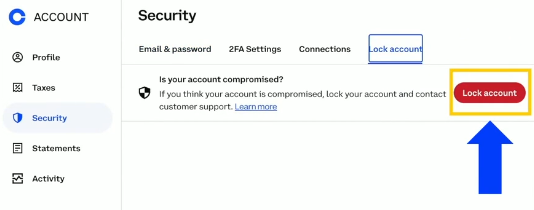
1. Lock Your Coinbase Account Right Away: As soon as you suspect a scam, lock your account to prevent any unauthorized transactions. This step ensures that even if a scammer has gained some access, they cannot move your crypto or make changes until you regain control.
2. Reset Coinbase and Email Passwords: Immediately change the passwords for your Coinbase account and the email linked to it. Make sure to use strong, unique passwords that you haven’t used elsewhere.
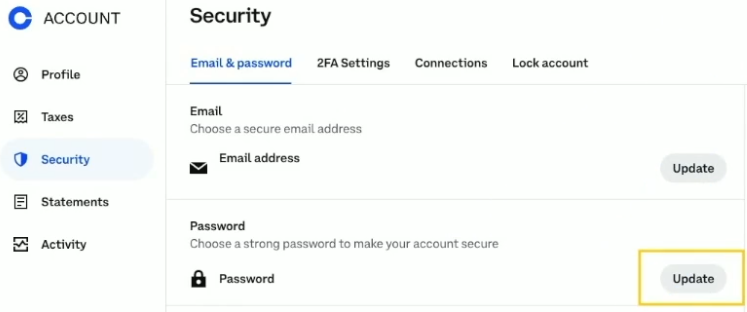
Avoid anything easy to guess, like birthdays or common words, because scammers often try old or simple passwords first.
3. Replace or Reconfigure 2FA Devices: If you use two-factor authentication (2FA), reset it or replace the device generating the codes. This prevents attackers from bypassing this extra security layer using stolen credentials or SIM swap attacks.
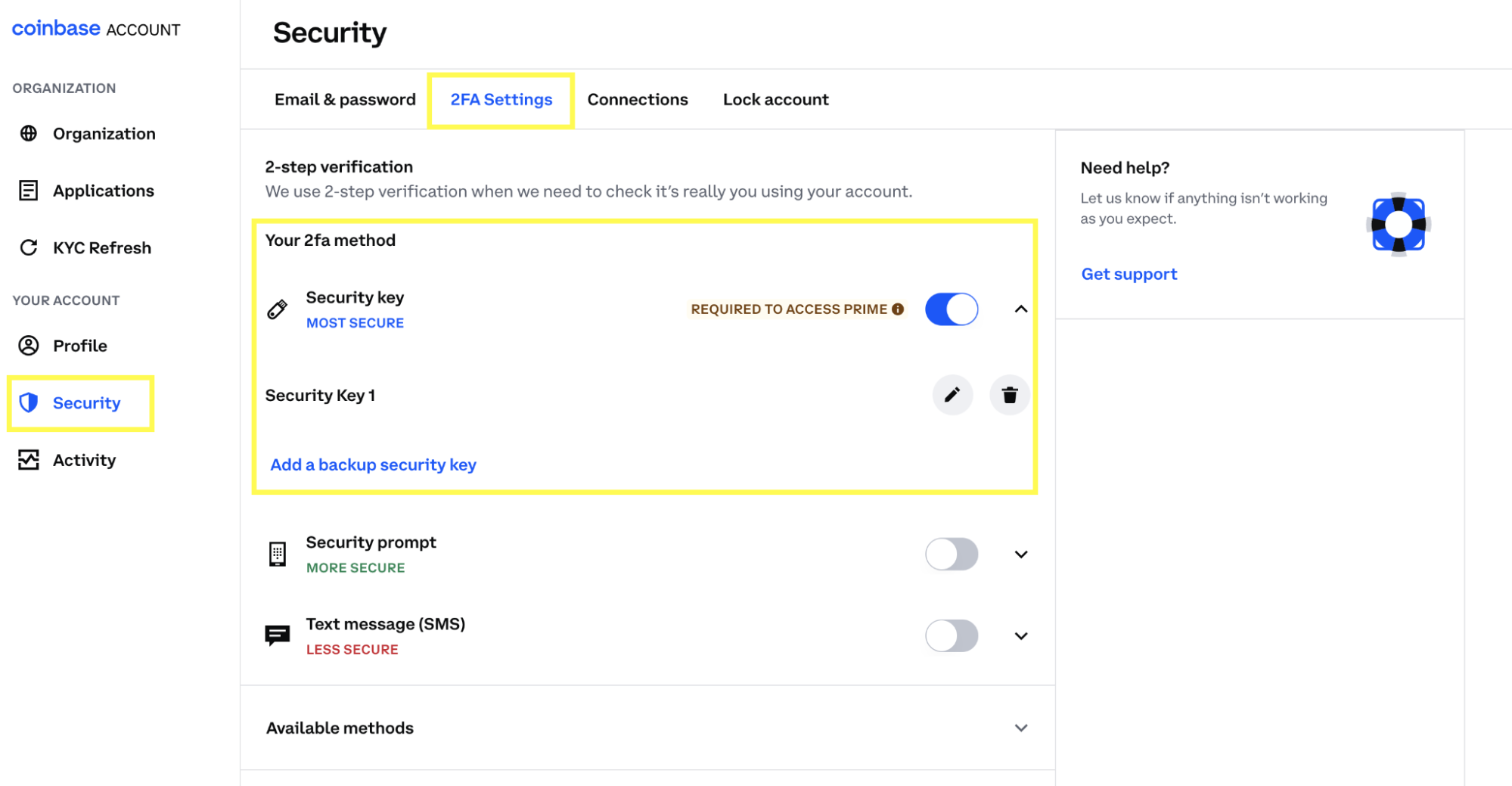
Hardware security keys are the safest option if available.
4. Review Transactions and Connected Apps: Carefully check your account history for any suspicious transactions or unauthorized access. Look at all apps or services connected to your Coinbase account and immediately disconnect any you don’t recognize or no longer use.
5. Report the Scam to Coinbase and Authorities: Contact Coinbase immediately through their official security email, security@coinbase.com, to report the incident. Include details like the suspicious email you received, any links you clicked, and the time of the event. Additionally, filing a complaint with local cybercrime authorities or relevant online reporting portals can help protect others and may aid investigations against the scammers.
Following these steps quickly can limit the damage and help you regain full control of your accounts safely. Once you’ve secured your Coinbase account, tools like Guardio help you identify if your credentials have been exposed elsewhere and guide you through securing weak links in your digital identity.
{{component-tips}}
Best Practices to Avoid Coinbase Scam Emails
The best way to stay safe is to adopt proactive security habits. The table below summarizes key practices and why they matter:
| Best Practice | What to Do | Why It Matters |
|---|---|---|
| Always Sign in Through coinbase.com Directly | Type coinbase.com manually in your browser instead of clicking links in emails | Prevents falling for phishing websites that look like Coinbase |
| Turn On 2FA or Hardware Security Keys | Enable two-factor authentication or use a physical security key | Adds an extra layer of protection even if your password is compromised |
| Use Strong, Unique Passwords with a Manager | Create complex passwords and store them in a password manager | Makes it difficult for scammers to guess or reuse passwords from other breaches |
| Keep Devices, Browsers, and Apps Updated | Regularly update your operating system, browser, and Coinbase app | Protects against known vulnerabilities that scammers can exploit |
| Report Suspicious Emails to Coinbase | Forward suspicious emails to support@coinbase.com | Helps Coinbase warn other users and take action against scammers |
| Check for Weak Links in Your Accounts | Use tools like Guardio to scan for reused passwords, missing 2FA, or outdated security settings across your accounts | Identifies vulnerabilities before attackers exploit them, keeping your crypto accounts secure |
How Guardio Protects Against Coinbase Scam Emails
Guardio provides proactive, cross-device protection that keeps your accounts secure and your information private. It stops phishing scams and fake login attempts before they start, while showing you exactly which accounts and settings may need attention. Here’s how it helps:
- Instantly Blocks Fake Coinbase Login Pages: Guardio scans sites in real time and shuts down fraudulent pages posing as Coinbase, stopping scammers from capturing your login details before you even type them in.
- Detects Phishing Links Across Email, SMS, and Web: From emails to texts to websites, Guardio flags malicious links the moment they appear. Even if a phishing email looks convincing, Guardio issues a warning before you click, keeping your crypto safe.
- Instant Alerts for Leaked Credentials: Guardio continuously scans breach databases for your Coinbase login details. If your credentials surface, you receive an immediate alert so you can reset passwords before attackers use them.
- Step-by-Step Recovery Support: If you fall victim to a scam, Guardio walks you through secure account recovery and helps you lock down weak spots to prevent further damage.
- Provides Continuous Monitoring Across Devices: Delivers continuous monitoring across all your devices, ensuring consistent protection no matter where or how you access your accounts.
By combining Coinbase’s built-in protections with Guardio’s proactive monitoring, you gain comprehensive defense against phishing emails, fake login pages, and credential theft. Guardio makes crypto security seamless and reliable, giving you peace of mind while managing your digital assets.
Conclusion
Coinbase scam emails are becoming increasingly sophisticated, and even careful users can be targeted. Recognizing the red flags, such as fake verification requests, urgent alerts, or suspicious links, is the first step to staying safe.
Using strong passwords, enabling 2FA or hardware keys, keeping devices updated, and signing in only through official channels can greatly reduce your risk. Tools like Guardio add an extra layer of protection by blocking phishing pages, detecting leaked credentials, and providing continuous monitoring across devices.
Staying informed and cautious ensures that your crypto assets remain secure and that you can enjoy managing your investments with confidence.
{{component-cta-custom}}
FAQs
Are there fake Coinbase QR codes in scam emails?
Yes and scanning one can instantly compromise your crypto.
- Never scan QR codes from emails unless verified on the official Coinbase site.
- Guardio blocks malicious redirects hidden behind phishing QR codes and links.
- Enable Guardio on your phone to protect against scam SMS with embedded QR traps.
- If you scanned one, clear browser data, reset passwords, and check for device tampering.
Learn how to block phishing links and fake redirects with Guardio's real-time protection.
Does Guardio actually block fake Coinbase sites?
Yes, before they can load in your browser.
- Guardio checks every URL in real time, including shortened or hidden ones.
- Fake login pages are blocked automatically, even if they mimic Coinbase branding.
- Guardio mobile app alerts you when phishing sites try to load on your phone.
- Phishing attempts from QR codes, email, or SMS are caught and flagged.
Read how Guardio stops fake login pages cold.