McAfee Renewal Scam: Signs, Risks & Ways to Stay Safe


Key Takeaways
- McAfee Renewal Scams Are Designed to Look Real: Scammers copy branding, wording, and layouts to trick users into paying fake fees or downloading harmful files.
- Urgent or Fear-Based Messages Are the Biggest Red Flag: Real McAfee alerts do not use threats or pressure tactics.
- Never Click Renewal Links Inside Emails: Always visit the official McAfee website directly to verify your subscription status.
- Quick Action Reduces Damage After a Scam Attempt: Cancel transactions, contact your bank, scan your device, and report the incident immediately.
- Guardio Adds Strong Real-Time Protection: It blocks harmful links, fake renewal pages, and phishing attempts before they reach you.
McAfee renewal scams have become one of the most common tactics cybercriminals use to trick people into paying for fake subscriptions, downloading malware, or handing over sensitive information. These scams mimic real antivirus alerts so convincingly through emails, pop-ups, invoices, or phone calls that even tech-savvy users sometimes fall for them. With AI-generated messages now making phishing attempts more polished than ever, the line between real and fake renewal notices is becoming dangerously thin.
What makes the McAfee renewal scam especially harmful is that it weaponizes trust. People rely on antivirus brands to feel safe online, and scammers exploit that confidence to create urgency and fear. A single click on a fake renewal link can expose your financial details, install spyware, or open the door to identity theft. Understanding how these scams work is essential for staying safe in a digital world where threats evolve faster than most users realize.
{{component-cta-custom}}
What is the McAfee Renewal Scam?
The McAfee Renewal Scam is a phishing scheme where cybercriminals pretend to be McAfee and trick you into renewing your antivirus subscription through fake emails, pop-ups, invoices, or calls. These messages often claim that your McAfee protection has expired or that your device is no longer safe, which creates fear and pushes you to act quickly.
Scammers use this pressure to make you click harmful links, call fake support numbers, or share your payment information. In many cases, they also install malware that looks like legitimate security software. Since the fake notices closely copy the real McAfee design, many people believe them and fall into the trap. Recognizing these fake renewal alerts early helps you avoid financial loss and identity theft.
How McAfee Renewal Scams Work and Their Main Types
McAfee renewal scams work by creating a false sense of urgency and convincing you that your security subscription is about to expire. These scams rely on fear, confusion, and the trust people place in well-known security brands. Below are the most common types you need to watch for:
Fake Renewal Emails and Invoices
These scams arrive as emails that look like real McAfee renewal notices. They often contain fake invoices, warnings that your subscription is ending soon, or links that lead to a fraudulent payment page.
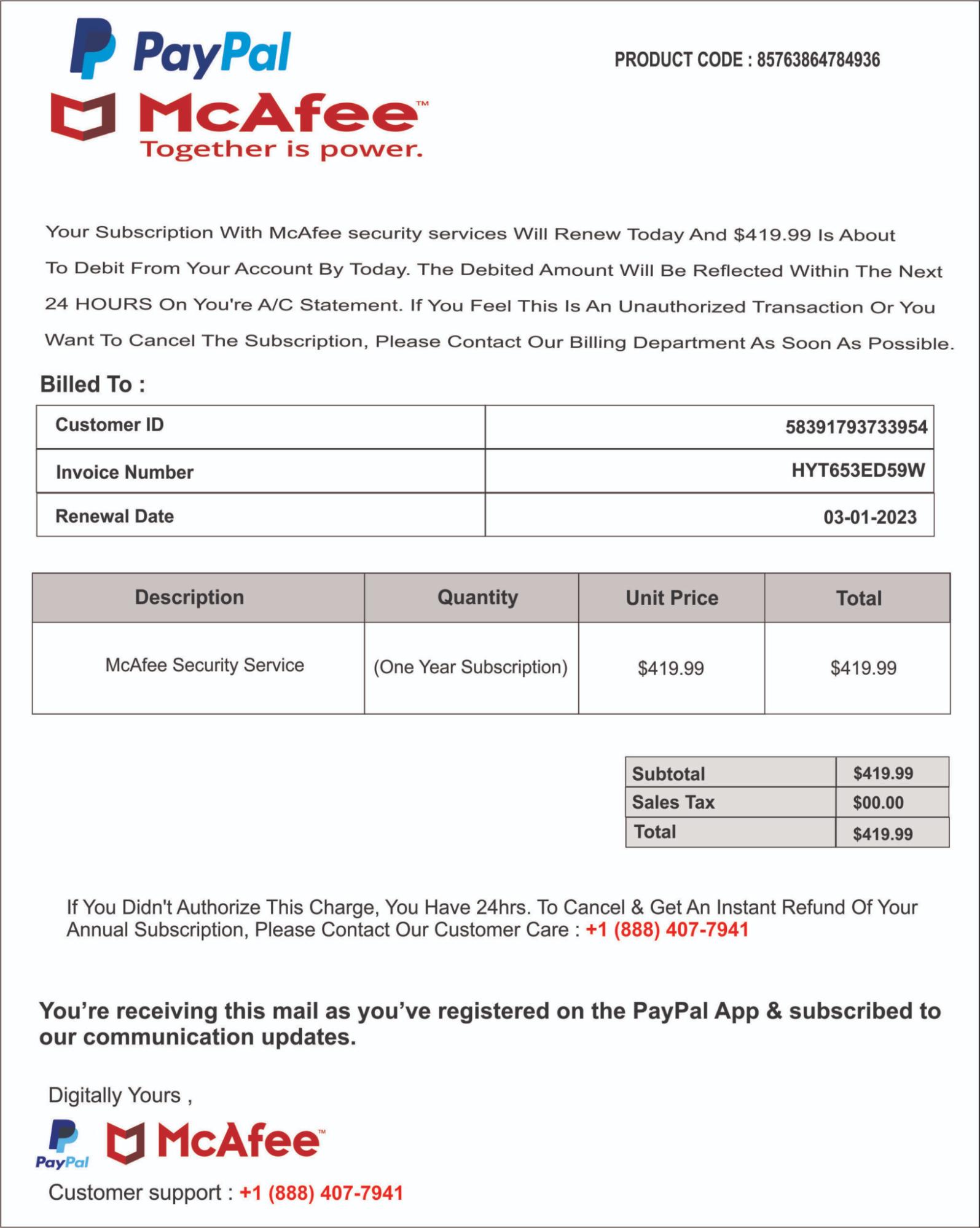
Many of these emails use copied branding, similar layouts, and urgent wording to convince you to renew immediately. Clicking any of the links can expose your personal data or allow malware to enter your device.
Pop-Ups and Redirects Mimicking McAfee
Scammers also use pop-ups or website redirects that claim your McAfee protection has expired. These appear on unsafe sites or through unwanted browser or push notifications. The pop-up usually pushes you to download a fake security tool or pay for a renewal.
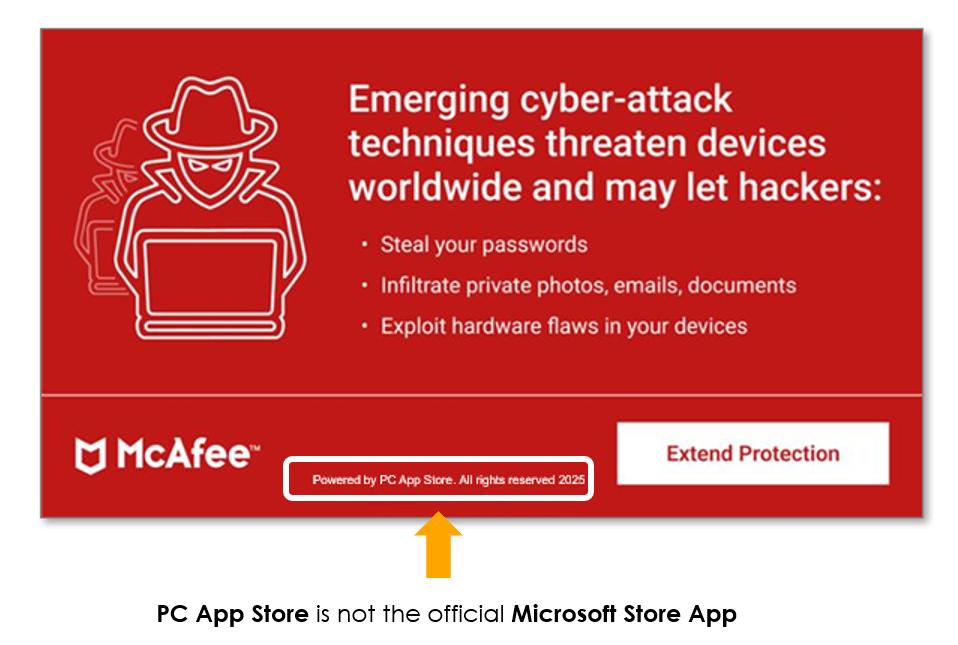
Since the design looks similar to the real McAfee interface, many users believe the alert and follow the instructions.
Call-Center and Refund Scams
In this type of scam, criminals send a message saying you have been charged for a McAfee renewal. The email or pop-up then gives a support number to call.
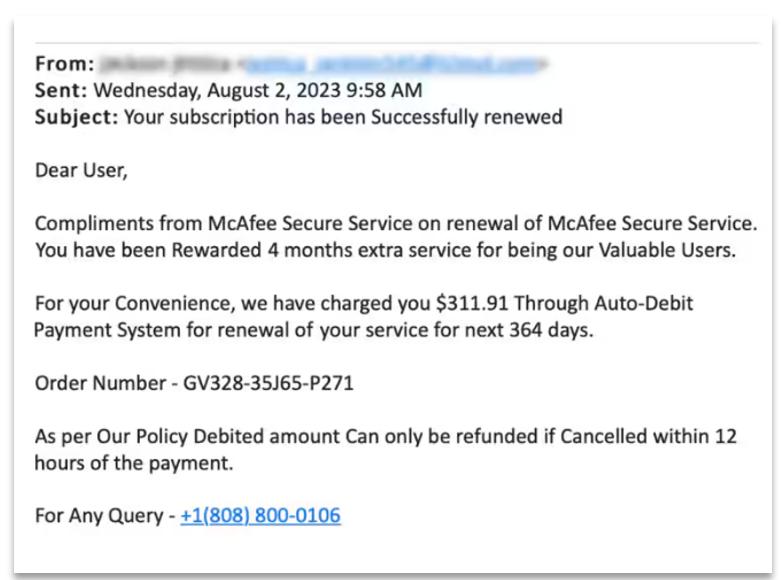
Once you call, the scammers pretend to be McAfee agents. They ask you to share card details, install remote access tools, or process a fake refund that steals money from your bank account. These call centers are operated by professional scam groups.
Malware-Based Renewal Traps
Scammers trick you into downloading harmful software by claiming it is a McAfee update or renewal file. Once installed, the malware can steal passwords, monitor your activity, or lock your device. This type of scam is especially dangerous because it gives criminals direct access to your system and personal information.
Real vs. Fake McAfee Renewal Notices: Key Differences
Fake McAfee renewal alerts look very similar to the real ones, which is why many people fall for them. A quick comparison of a few key signs can help you understand the difference instantly. Here are the four most important checks:
| Feature | Real Notice | Fake Scam Notice |
|---|---|---|
| Messaging and Language | Calm and informational | Uses fear or urgent warnings |
| Email Domains or Invoices | Sent from official McAfee domains | Comes from unknown or strange email IDs |
| Renewal Links Inside Emails | Safe and verified | Phishing links that steal information |
| Account/Identity Status | Correlates with your security dashboard and real account status (e.g., your security tool shows weak 2FA). | Has no connection to your real account status, weak spots, or your current security settings. |
Why the McAfee Renewal Scam is Spreading
McAfee renewal scams are increasing rapidly because cybercriminals now have access to more advanced tools, highly realistic impersonation methods, and broader channels for reaching potential victims. Instead of the poorly written, easily spotted phishing attempts of the past, today’s scammers use AI-generated messaging, near-perfect branding replicas, and fully engineered fake support systems that closely mirror legitimate McAfee communication. This level of polish makes the scams far harder for users to identify at a glance. As a result, more people are unknowingly engaging with fraudulent alerts and renewal prompts. Below are the key factors driving the surge in these sophisticated scams:
Increase in AI-Generated Phishing Attempts
AI tools allow scammers to create convincing emails, invoices, and messages that sound professional. The grammar is cleaner, the tone is more accurate, and the alerts look very close to real McAfee communications.
🚨Tech support scams aren’t going anywhere.
Guardio (@GuardioSecurity) May 29, 2025
They’ve more than doubled so far in 2025 - up 137% since November.
Scammers are now using AI to create ultra-convincing pop-ups, fake alerts, and support calls at scale 🧵 pic.twitter.com/d9qlPwZ5Zf
This makes it harder for users to identify scams by simply checking for spelling or formatting mistakes, which used to be a clear giveaway.
Misuse of Trusted Security Brands
McAfee is a well-known name in cybersecurity, and people trust it to protect their devices. Scammers take advantage of this trust. When users see a familiar logo or a known brand name, they react quickly without double-checking. This creates the perfect opportunity for criminals to push fake renewals and collect payments or personal information.
Rise of Fake Support and Refund Portals
Many scam groups now operate entire websites that look like real customer support portals. These sites offer fake renewal help, refund assistance, or subscription checks. Once you enter your details, scammers collect your data or guide you toward harmful downloads. Some even run call centers that pretend to be McAfee support to increase their chances of success.
Impact and Consequences of the McAfee Renewal Scam
McAfee renewal scams do more than trick you into a quick payment. They create long-term problems that affect your money, your identity, your devices, and even your peace of mind. Here are the main consequences you should be aware of.
- Financial Loss and Unauthorized Payments: Victims often end up paying fake renewal fees or sharing their card details, which leads to unexpected charges and direct money loss.
- Identity Theft and Data Compromise: Scammers collect personal information such as email credentials, card numbers, and addresses, which can later be used for identity misuse.
- Malware or Spyware Infections: Some fake renewal links install harmful programs that track your activity, steal passwords, or damage your device.
- Emotional and Psychological Stress: Falling for a scam can cause worry, embarrassment, and loss of confidence in digital tools, especially when sensitive data is involved.
What to Do if You’re Targeted in a McAfee Renewal Scam
If you suspect that you interacted with a fake McAfee renewal message, the most important thing is to act quickly. Fast action can significantly reduce financial damage, cut off scammer access to your accounts, and help eliminate any malicious software that may have been installed. The steps below show what you should do immediately:
| Action | What It Means | Why It Helps |
|---|---|---|
| Disconnect and Cancel Any Transactions | Stop ongoing payments or close suspicious pages | Prevents money loss and stops scammers from charging you |
| Contact Your Bank or Card Provider | Inform them about the scam attempt | Allows them to block the card and reverse unauthorized payments |
| Scan Devices for Malware | Use a trusted antivirus to check your system | Removes harmful files or tracking programs installed by scammers |
| Report to McAfee and Cybercrime Authorities | Share details of the scam attempt | Helps others stay safe and supports official investigations |
McAfee Renewal Scam Post-Scam Identity Cleanup & Account Security
Once you handle the immediate steps after a scam attempt, the next focus is cleaning up any leftover risks. This helps you protect your identity, secure your accounts, and prevent scammers from misusing any information they may have collected.
- Leverage a Tool Like Guardio: Use an online security tool like Guardio to scan for reused passwords, missing two-factor authentication, and outdated security settings. It highlights exactly what’s vulnerable so you can fix it before attackers find and exploit it.
- Check Accounts for Exposed Credentials: Look for any logins that may have been leaked and change the passwords immediately. This prevents scammers from using your accounts for further damage.
- Review Linked Credit or Debit Card Activity: Go through recent transactions and check for any small test charges or unfamiliar payments. Report anything suspicious to your bank right away.
- Secure Email and Cloud Service Accounts: Update passwords, enable two-factor authentication, and review recent login history. Your email is often the main entry point for attackers, so securing it is essential.
{{component-tips}}
How to Report McAfee Renewal Scams
Reporting a McAfee renewal scam helps you protect yourself and also prevents others from falling for the same trap. It creates an official record of the incident and gives cybercrime teams the information they need to track active scam networks. Here are the main places where you should report these scams:
- Report to McAfee Support: Forward the scam email or screenshots to McAfee’s official support team. This helps them block similar fake messages and warn other users.
- File a Complaint with Your Local Cybercrime Unit: Visit your regional cybercrime reporting portal or police site and submit a complaint. Provide details such as email IDs, phone numbers, and links used in the scam.
- Report to Your Email Provider: Mark the scam message as phishing. This trains your email service to block similar messages automatically in the future.
- Submit the Scam Link to Browser Safety Tools: Chrome, Safari, Edge, and Firefox allow you to report unsafe websites. This helps get the fake renewal pages taken down faster.
- Inform Your Bank or Card Company: If the scam involves payment attempts or card details, reporting it ensures better monitoring and quick action on suspicious activity.
How Guardio Helps You Stay Protected from McAfee Renewal Scams
Guardio stops security threats before they start with proactive, cross-device protection that keeps your accounts secure, your information private, and you in control. It works silently in the background and protects you across all your devices. Here are the main ways it keeps you safe:
- Phishing Detection: Advanced AI scans emails for impersonation attempts, spoofed senders, and fake McAfee branding. Even the most realistic scam messages are identified and flagged.
- Cross Device Protection: Guardio works across devices, keeping you protected whether you open messages on a laptop or a mobile device.
- Real Time Alerts: You receive instant notifications whenever Guardio detects a harmful link or suspicious page. The alerts also provide simple steps to avoid the threat.
- Blocks Harmful Links and Attachments: Dangerous sites, malicious downloads, and suspicious attachments are stopped before they reach your device.
Conclusion
McAfee renewal scams are becoming more common, more convincing, and more harmful. They take advantage of fear, urgency, and the trust people place in well-known security brands. By understanding how these scams work and learning the key signs to watch for, you can avoid fake renewal pages, misleading emails, and harmful downloads. Acting quickly after a scam attempt and securing your accounts also reduces long-term risk.
With real-time protection and advanced phishing detection, Guardio helps you stay secure across your accounts and communication channels with confidence. Awareness, quick action, and strong protection together create the safest defense against McAfee renewal scams.
{{component-cta-custom}}
FAQs
How do I know if my business is being targeted by a renewal scam?
If you’re seeing sudden McAfee warnings or odd invoices, you're likely in a scammer’s crosshairs.
- Check your Guardio dashboard for blocked pages that mimic McAfee or other antivirus brands.
- Review your business email inboxes for spoofed renewal messages using urgency or threats.
- Use Guardio’s identity monitoring to see if any company emails have been part of a data breach.
- Educate your team to never call support numbers or click links in renewal alerts.
Protect your operations using Guardio for Business, which covers multiple devices and users.
What should I do if I gave payment info to a McAfee scam site?
Act quickly to limit the damage and reclaim control.
- Call your bank or card provider immediately and report unauthorized charges.
- Change your passwords, especially for email and banking apps.
- Run a security scan using Guardio, which spots and neutralizes malware or spyware.
- Add your info to Guardio’s identity monitoring to track for fraud.
Use the post-scam recovery guide to regain your security step by step.
Are AI-generated phishing emails harder to detect now?
Absolutely, scammers now use AI to mimic real alerts with perfect grammar and design.
- Stop looking for typos alone, even legit-looking emails can be fake.
- Check the sender’s domain (e.g., support@mcafee-update.com is likely fake).
- Avoid links entirely, go directly to the company’s website to verify renewals.
- Enable Guardio’s real-time phishing protection, which flags AI-forged emails.
Learn how to spot smarter phishing tactics even when they look professional.
How does Guardio actually block McAfee renewal scams?
Guardio uses AI to identify spoofed branding, fake invoices, and phishing URLs instantly.
- Blocks known scam domains in real time, before they can load.
- Alerts you when pop-ups or redirects mimic antivirus software.
- Scans Gmail inboxes for phishing attempts if you've connected Email Security.
- Flags and neutralizes malicious extensions that mimic McAfee updates.
Guardio works across devices, see how mobile protection works to extend coverage.
Where can I check if Guardio blocked a fake McAfee site?
Both the desktop dashboard and mobile app show detailed logs of blocked threats.
- On desktop, visit the Browsing Activity page and click the eye icon to reveal full site URLs.
- On mobile, tap “Browsing Protection” and review each blocked website’s link.
- Click the three dots next to each site to allow or report a misblock.
- See what Guardio’s AI has flagged across all your devices in one central hub.
Learn to manage your allowed and blocked sites via the Guardio dashboard.