Bank Fraud Alert Text Scam: How to Verify Without Clicking


Key Takeaways
- Bank fraud alerts are the perfect cover: Banks actually send these, so the scam premise feels legitimate.
- The scam is in the response path: Real alerts direct you to your app; scam alerts provide a link or phone number.
- Caller ID means nothing: Scammers can spoof any number, including your bank's actual customer service line.
- One-time codes are account keys: No legitimate bank employee will ever ask you to read a verification code to them.
- The safest response is no response: Verify by opening your bank app yourself, not by using anything in the message.
If a bank alert asks you to click a link or call a number in the message, stop. Open your bank app directly or call the number on your card to verify.
{{component-cta-custom}}
Why Bank Fraud Alert Scams Are So Effective
Bank fraud alerts exploit something real: banks do send fraud alerts. You probably have legitimate ones in your message history right now. When a scam message arrives looking identical to the real ones, your defenses are already down.
The psychology is powerful. When someone tells you your money is at risk, your instinct is to fix it immediately. That urgency - the need to act now - is exactly what scammers exploit. They want you to click or call before you question whether the message itself is the threat.
How Number Spoofing Works (Why Caller ID Proves Nothing)
Many people believe that if their phone shows the call is from their bank, it must be legitimate. This is dangerously wrong.
| Spoofing Method | How It Works | What You See |
|---|---|---|
| VoIP Caller ID Spoofing | Scammers use internet phone services that allow setting any outgoing caller ID | Your bank's actual phone number appears on your screen |
| SMS Sender ID Spoofing | Text message sender names can be set to almost anything | "Chase Alerts," "Wells Fargo," or your bank's name |
| SIM Swapping | Scammers transfer your phone number to their device | They receive your calls and texts, including verification codes |
The number on your screen proves nothing. A call that appears to be from Chase, Wells Fargo, or Bank of America could originate from anywhere in the world.
Real Bank Scam Messages (And Why People Fall for Them)
Example 1: The Declined Transaction
What the message says:
"ALERT: A $847.32 charge at AMAZON was declined. If this was not you, call 1-888-XXX-XXXX immediately."
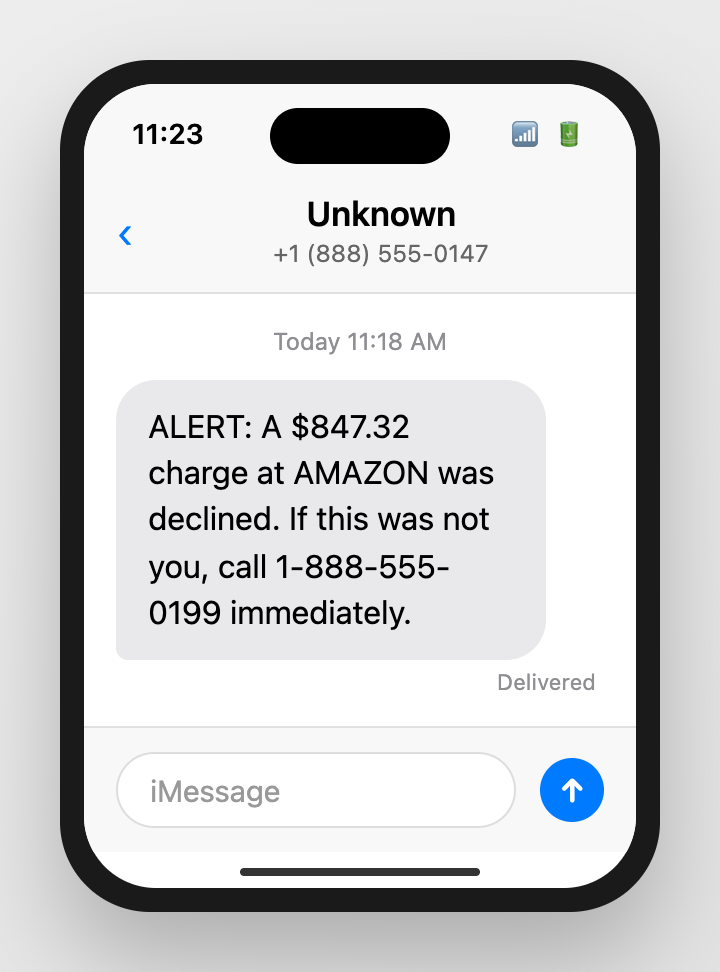
Why people fall for it:
- The specific dollar amount and merchant name feel real - they match how real alerts look
- "Declined" suggests your bank is already protecting you - it feels helpful, not threatening
- The phone number looks like a legitimate toll-free bank number
- Amazon is used because almost everyone shops there - it is plausible
Safe response: Open your banking app and check recent transactions. If there is a problem, your app will show it. Do not call numbers from text messages.
Example 2: The Foreign Login
What the message says:
"Wells Fargo: Unusual sign-in from IP 192.168.XX.XX (Moscow, Russia). Click here to secure your account: [link]"
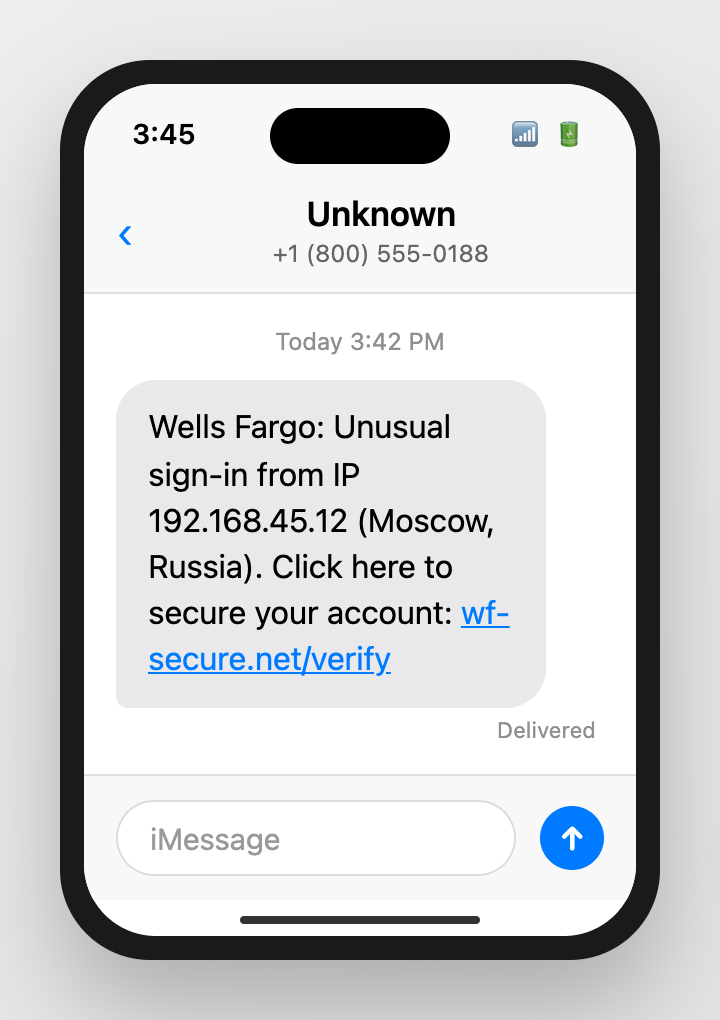
Why people fall for it:
- Technical details like IP addresses make it seem sophisticated and real
- A foreign location (especially Russia) triggers immediate fear
- "Secure your account" feels like a protective action
- The link appears to go to Wells Fargo
Safe response: Go directly to your bank's website by typing the URL yourself. Check security settings and recent login activity there.
Example 3: The Locked Card
What the message says:
"Your debit card ending in 4532 has been locked. Reply UNLOCK or call 1-800-XXX-XXXX to restore access."
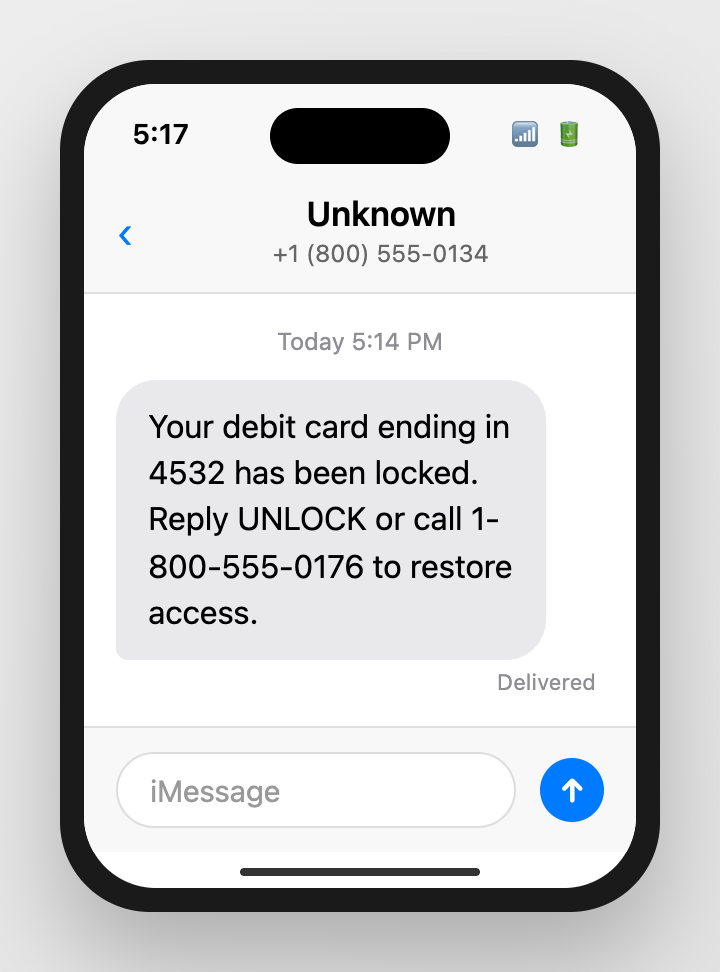
Why people fall for it:
- Last four digits of your card (often from data breaches) add false legitimacy
- "Locked" creates urgency - you cannot use your card until this is fixed
- Replying seems harmless - it is just one word
- The phone number looks official
Safe response: Try a small purchase with your card, or check your banking app. If locked, your bank will have notifications in your account.
The One-Time Code Trap
One-time verification codes are the last line of defense for your accounts. Scammers know this - which is why bank scams increasingly target these codes.
How the Scam Works
- Scammer already has your username and password (from a data breach or previous phishing)
- They attempt to log in to your account, triggering a verification code sent to your phone
- They call you immediately, pretending to be your bank's fraud department
- They say: "We detected suspicious activity. To verify it is really you, please read me the code you just received."
- The moment you read that code, they enter it and gain full account access
Critical rule: No legitimate bank employee will ever ask you to read a verification code to them. If anyone asks for a code you received, hang up immediately.
Risks of Falling for Bank Fraud Alert Scams
| Risk | What It Means | Impact on You |
|---|---|---|
| Credential theft | Scammers capture your online banking login | Full access to view accounts, add payees, initiate transfers |
| One-time code capture | Scammers bypass your two-factor authentication | They complete the login you blocked and take over your account |
| Account takeover | Scammers change your password, email, and phone number | You are locked out; recovery takes days or weeks |
| Wire transfer fraud | Scammers initiate transfers to accounts they control | Money is gone within hours; recovery is rare for wire transfers |
What to Do If You Already Interacted
Step 1: If You Clicked a Link and Entered Credentials
- Log into your bank through the official app or website immediately
- Change your password to something completely new
- Review recent transactions for anything unauthorized
- Check if any new payees were added or if contact info was changed
- Enable all available security features (transaction alerts, two-factor authentication)
- Call your bank's official number (on your card) to report the incident
Step 2: If You Shared a One-Time Code
- This is urgent - scammers may be actively in your account right now
- Call your bank immediately using the number on your card or statement
- Request a temporary freeze on your account
- Change your password and security questions
- Review all recent transactions and pending transfers
- Check for new payees, address changes, or email/phone changes
Step 3: If You Shared Card Details
- Report the card as compromised immediately
- Request a new card with a new number
- Review all recent and pending transactions
- Set up transaction alerts for the new card
{{component-tips}}
How Guardio Stops Bank Phishing Before You Fall For It
Bank phishing pages are designed to be indistinguishable from the real thing. Same logo, same colors, same login form, same URL structure. The only difference is where your credentials go when you hit submit.
Guardio provides protection at the critical moment:
- Real-time link analysis: When you click a link in a suspicious text, Guardio analyzes the destination before the page fully loads. It checks domain age, SSL certificates, page structure, and hundreds of other signals.
- Lookalike detection: Scammers register domains like "wellsfargo-secure-login.com" or "chase-verify-account.net" that look legitimate at a glance. Guardio recognizes these impersonation patterns even for newly-registered domains.
- Credential harvesting detection: Guardio identifies pages designed to capture login credentials by their behavior, not just their reputation. A phishing page created an hour ago gets caught.
- Cross-device protection: Bank scams arrive on your phone, tablet, and computer. Guardio works across all your devices.
{{component-cta-custom}}
Report Bank Scams
- FTC: ReportFraud.ftc.gov
- FBI Internet Crime Complaint Center (IC3)
- Your bank's official fraud reporting channel (number on your card)
- Forward scam texts to 7726 (SPAM) - your carrier's spam reporting service
Sources
FAQs
Are bank fraud alert texts always scams?
Not always, but treat messages with links as high risk. Verify through the official bank app or known numbers.
What is the safest way to confirm an alert?
Open the bank app directly or call the number on your card. Do not rely on text links.
What if I clicked and entered my login?
Change your password immediately, enable additional security, and contact your bank through official channels.
Why do scammers ask for one-time codes?
Codes can let them sign in as you. Never share codes.
Should I reply YES or NO to a suspicious alert?
Do not reply if you are unsure. Verify in the app or by calling a known number.
How can Guardio help?
Guardio can warn you about suspicious links and lookalike sign-in pages before you interact.