Coinbase Wallet Scams: How They Work and How to Protect Yourself


_2026-05-31_07-21-22%20(1).avif)
Key Takeaways
- Coinbase Wallet Scams Target Self-Custody Assets Directly: Fake dApp connections, seed phrase theft, and clone apps drain funds through on-chain transactions that no support team can reverse.
- Wallet Scams and Account Scams Are Not the Same Problem: Wallet scams chase crypto in the self-custody Coinbase Wallet, and account scams chase login credentials for the Coinbase exchange and are partially recoverable through support.
- AI and Drainer-as-a-Service Have Erased the Old Visual Cues: Pixel-accurate clone sites, deepfaked support pages, and sponsored search ads have made wallet scams indistinguishable by sight alone.
- The First Hour After a Bad Connection Decides the Outcome: Revoking approvals, moving remaining assets, rotating passwords, and scanning for malware in that window is what keeps a malicious click from becoming a total loss.
- Burner Wallets, Hardware Wallets, and Offline Seeds Neutralize Most Attacks: Pairing strong habits with a separate test wallet for new dApps closes nearly every common entry point by design.
- Guardio Helps Identify and Block Coinbase Wallet Scams Before They Reach You: Guardio helps users determine whether links, websites, and wallet-related destinations are safe across search, email, SMS, and other common attack channels before a malicious connection occurs.
You see a Coinbase Wallet support DM, a search ad for a token mint, or a Discord link to an airdrop, and you have to decide in seconds whether it is safe to connect. The brand name looks right, and the prompt looks ordinary. And yet the contract on the other side could be a wallet drainer that has been live for less than a day.
Modern Coinbase Wallet scams have erased most of the visual cues users used to rely on. Clone sites carry valid HTTPS certificates, fake "Coinbase support" agents arrive through pixel-perfect impersonation accounts, and drainer-as-a-service kits sold on dark web forums let any operator launch a campaign in a weekend. The good news is that almost every warning sign you need is visible before the signature is given, if you know where to look.
This guide explains how Coinbase Wallet scams work, where they start, the structural patterns that give them away, and the exact response steps if a click slips through. It also covers how a real-time, cross-device protection layer like Guardio helps users identify whether a URL is safe before they click, connect a wallet, or approve a transaction.
{{component-cta-custom}}
What Is a Coinbase Wallet Scam?
A Coinbase Wallet scam is any attack that targets the self-custody Coinbase Wallet, the standalone wallet app and browser extension, rather than the centralized Coinbase exchange account. Because self-custody wallets put the user in sole control of their private keys, every loss is permanent and unrecoverable.
It typically tricks the user into one of two actions: sharing their recovery phrase or signing a malicious approval transaction that hands over spending rights on their tokens. Once either happens, the attacker can drain the wallet on their own timeline, often weeks later, after the victim has forgotten the connection.
Coinbase Wallet Scam vs. Coinbase Account Scam
Many users use "Coinbase scam" as a single term, but the two products attract very different attacks. Knowing which surface is under attack changes the response.
Why Coinbase Wallet Scams Are Getting Harder to Spot
Crypto scams have evolved past obvious typos and broken English. Today's attacks are professionally designed, AI-assisted, and operationally faster than the average user's response time.
- Wallet Drainer Attacks Are Increasing: Scam Sniffer's drainer reporting tracked steep year-over-year growth in drainer victims, with drainer-as-a-service kits now sold openly on dark web forums and operated by affiliates who keep a cut of every drained wallet.
- Fake Coinbase Support Scams Are Growing: Attackers now use polished impersonation accounts, spoofed phone numbers, and AI-generated support conversations to trick users into revealing seed phrases or approving malicious transactions.
- AI Is Making Crypto Phishing More Convincing: Generative AI now produces flawless support emails, deepfaked livestream giveaways, and pixel-accurate clone sites in minutes.
- One Wrong Wallet Approval Can Drain Your Assets: Unlike a stolen password, a malicious token approval cannot be revoked retroactively. A single confirmed signature is all the attacker needs.
Where Coinbase Wallet Scams Usually Start
Most wallet scams do not begin on a hacking forum. They begin on the same platforms that users browse every day.
Scam Ads in Search Results and Social Media
Paid Google and X ads regularly impersonate Coinbase Wallet, top DeFi protocols, and major NFT mints.
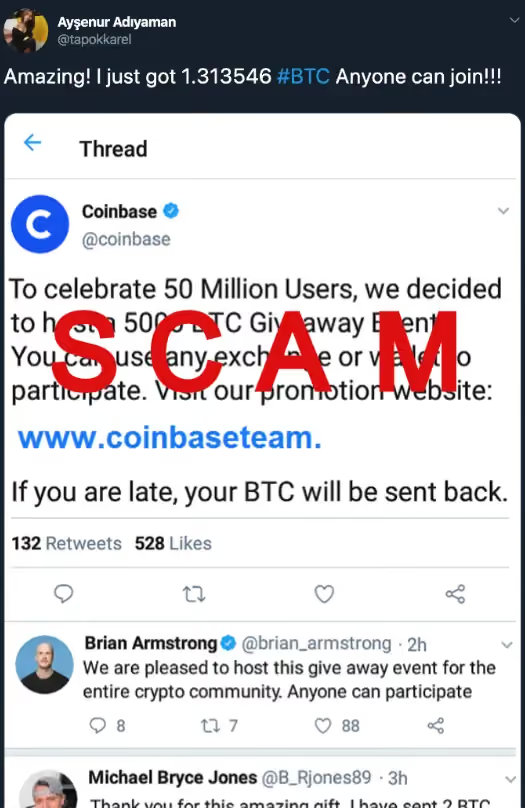
Independent monitoring of sponsored crypto search results has repeatedly surfaced impersonation listings sitting directly above the legitimate site. The sponsored slot above organic results is now the single most common first touchpoint in drainer victim reports.
Fake Crypto Support Messages
Unsolicited DMs on X, Telegram, and Discord posing as Coinbase support are the leading first contact in support-impersonation cases tracked by the FTC.
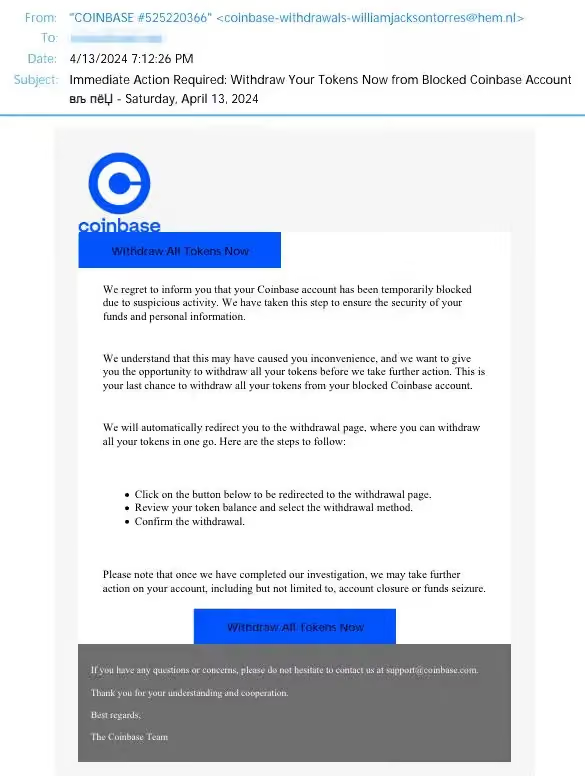
Real Coinbase support never opens a chat first, never calls without a prior support request, never asks for a seed phrase, and never instructs users to move or withdraw their assets.
Malicious Links on Discord and Telegram
Public Discord servers and Telegram crypto groups are reliable distribution channels for drainer links, often disguised as airdrop announcements, token mint invites, or "verified" bot commands.
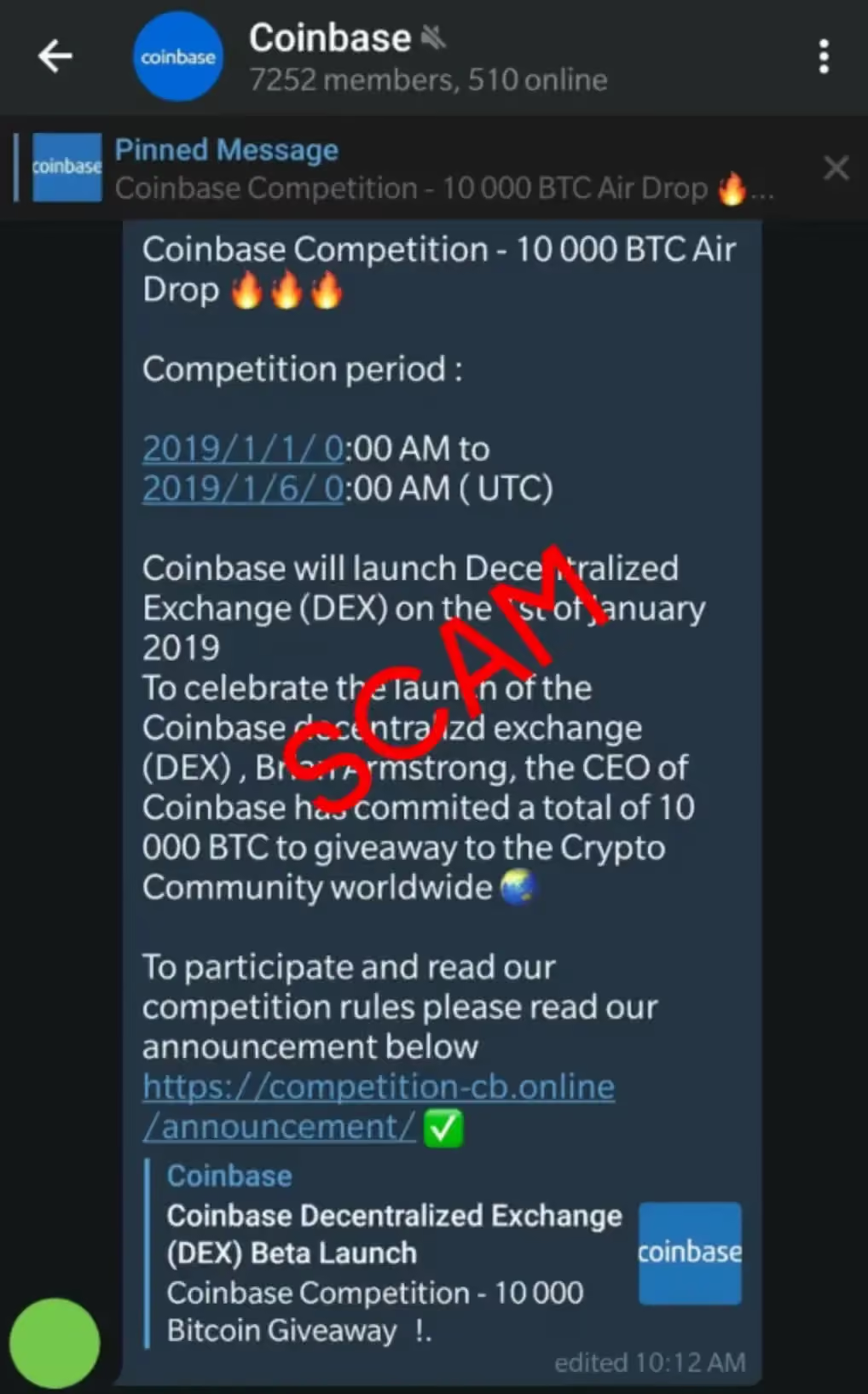
Even moderator accounts can be compromised, lending fake links the appearance of authority.
Risky Browser Extensions
Independent researchers have documented dozens of browser extensions that exfiltrate seed phrases or inject malicious transaction approvals after installation. Some extensions begin life clean and turn hostile only after an ownership change, which is why ongoing extension auditing matters as much as the initial install check.
Common Coinbase Wallet Scam Types
The catalog of wallet scams shifts every quarter, but most attacks still fall into five familiar categories.
How to Spot a Fake Coinbase Wallet Site Before Connecting
A handful of checks, run in under a minute, will catch most fakes before any signature is given.
- Verify the Exact Domain in the Address Bar: The official Coinbase Wallet site is coinbase.com/wallet, and the official browser extension is published by Coinbase, Inc. Letter-swapped lookalikes (coinbasse, c0inbase, coinbase-wallet.app) are the single most common giveaway.
- Check the SSL Certificate: A legitimate Coinbase property uses a certificate issued to a Coinbase-owned organization. A click on the padlock reveals a generic Let's Encrypt certificate on most clone sites, a signal that the domain was spun up cheaply and recently.
- Inspect Connection Prompts: A safe dApp requests a read-only signature for login, not an unlimited token approval. If a connection screen requests broad permissions on USDC, ETH, or any major token at first contact, close the tab.
- Search the Contract on a Block Explorer: Legitimate projects often maintain verified contracts, visible transaction history, and public documentation on block explorers such as Etherscan or Basescan. Newly deployed or unverified contracts deserve additional scrutiny.
- Run the Link Through a Real-Time Site Checker: Browser-level protection tools flag known drainer infrastructure before the page even loads, which closes the window in which a hurried user might click "Connect." Tools such as Guardio help determine whether a URL is safe before you connect a wallet, using real-time analysis rather than relying solely on historical reputation data.
{{component-tips}}
Best Practices to Protect Yourself From Coinbase Wallet Scams
Most successful Coinbase Wallet scams exploit habits, not vulnerabilities. Tightening a handful of routines closes most of the attack surface.
- Never Share Your Seed Phrase With Anyone: No legitimate company, support agent, or app will ever ask for your 12 or 24 recovery words. Anyone who does is running a scam.
- Store Recovery Phrases Offline Only: Keep the seed phrase on paper or metal, in two separate physical locations. Cloud storage, screenshots, and password managers all expand the attack surface unnecessarily.
- Download Wallet Apps From Official Sources Only: Install Coinbase Wallet from coinbase.com/wallet, the Chrome Web Store listing from Coinbase, Inc., or the official Apple and Google Play listings. Sideloaded APKs and third-party stores carry the bulk of clone-app cases.
- Avoid Unknown Wallet Connections and dApps: Treat every new dApp as untrusted until verified. Limit connections to projects with audited contracts, established communities, and a recognizable team.
- Use a Hardware Wallet for Large Holdings: A hardware wallet keeps signing isolated from the internet-connected device. Even a fully compromised laptop cannot move funds without physical button confirmation on the device.
- Avoid Public Wi-Fi During Crypto Transactions: Public Wi-Fi increases exposure to rogue captive portals, malicious hotspots, and social engineering attacks. For wallet activity, a trusted network remains the safer option.
What to Do if You Connected to a Scam Site
The first hour after a malicious connection decides whether the loss stays at zero or becomes total.
What to Do if You Fell for a Coinbase Wallet Scam
When funds have already left the wallet, the priority shifts from prevention to containment and reporting.
- Report the Scam to Coinbase Directly: File a report through help.coinbase.com. Coinbase cannot reverse on-chain transactions, but can flag the destination address and assist law enforcement requests.
- File a Report With the FTC and IC3: Submit complaints at reportfraud.ftc.gov and ic3.gov. These reports feed federal investigations and the public scam-pattern databases that protect future victims.
- Monitor Accounts for Identity Theft: If any personal information was shared, place a credit freeze, enable identity monitoring, and watch for downstream phishing that uses the leaked data.
- Alert Your Bank if Fiat Funds Were Involved: If the scam touched a linked bank account or debit card, notify the bank immediately. Domestic ACH and card transactions often have a short reversal window.
How Guardio Helps Block Coinbase Wallet Scams
Manual verification works when users remember to do it. The challenge is that Coinbase Wallet scams increasingly arrive through search results, messages, social platforms, ads, and compromised websites. Guardio helps users identify unsafe destinations, suspicious links, and emerging scam infrastructure before those threats turn into wallet compromises.
- Helps Verify Whether a URL Is Safe Before You Interact: Guardio inspects every URL the moment it is opened, comparing it against constantly updated threat intelligence. Clone Coinbase Wallet sites and drainer dApps are blocked at the network layer before the wallet ever sees the request.
- Filters Phishing Links Across Email, SMS, and Search: Guardio's link scanner runs across Gmail, web search results, and SMS previews on mobile, catching fake Coinbase support and drainer links wherever they appear.
- Flags Fake and Lookalike Crypto Sites Before You Interact: Lookalike domains, including the well-worn coinbasse, c0inbase, and coinbase-vvallet patterns, are detected through real-time domain analysis and surfaced as a full-page warning rather than a dismissible notification.
- Identifies Risky Browser Extensions: Guardio continuously surfaces security risks that may increase exposure to scams, including unsafe browser extensions, compromised accounts, and suspicious online activity.
- Alerts You When Personal or Financial Data Is Exposed: Guardio's identity monitoring scans data breaches and dark web sources for email addresses and financial details, surfacing exposures that often precede a targeted wallet attack.
These protections work continuously across devices and online channels, helping users identify unsafe websites, risky links, account exposures, and emerging scams before they lead to financial loss.
Conclusion
Coinbase Wallet scams are not a future problem; they are a daily one. The combination of drainer-as-a-service kits, AI-cleaned phishing, and search-ad impersonation has pushed the threat firmly into mainstream territory. Self-custody means full responsibility for every signature, and the gap between a safe approval and a drained wallet is one careless click.
A layered defense closes most common attack paths: offline seed storage, a hardware wallet for significant holdings, a burner wallet for testing new dApps, and real-time protection that helps identify unsafe links and websites before you interact with them.
FAQs
How can remote workers safely manage crypto from work devices?
The safest approach is to separate crypto activity from work-related browsing whenever possible.
- Use a dedicated browser profile for wallet activity and crypto research.
- Avoid installing crypto-related extensions on employer-managed devices.
- Keep operating systems and browsers updated to reduce exposure to known vulnerabilities.
- Never approve transactions while distracted during meetings, travel, or multitasking.
For more practical security habits, check out Guardio's guide to browser protection.
Why are scammers obsessed with creating urgency around crypto transactions?
Urgency is one of the most effective social-engineering tactics because it pushes people to act before they verify.
- Pause whenever a message includes a countdown, deadline, or "limited-time" reward.
- Verify announcements through official channels, not links inside messages.
- Be suspicious of "wallet at risk" warnings that demand immediate action.
- Treat surprise rewards and airdrops as untrusted until proven otherwise.
Understanding how manipulation works can help you recognize phishing scams before they succeed.
Can scammers target me even if I don't hold much crypto?
3. Can scammers target me even if I don't hold much crypto?
Yes, attackers often target anyone who appears interested in crypto, regardless of wallet size.
- Small wallets are frequently tested first because victims may be less cautious.
- Compromised accounts can be used for future scams, even after funds are gone.
- Email addresses and phone numbers linked to crypto activity can become targeting signals.
- Watch for follow-up scams promising recovery services or stolen-fund refunds.
Learn how exposed information can lead to larger problems in Guardio's guide to data breaches.
Does Guardio help if a scam site is brand new?
Yes, many modern scams appear and disappear quickly, which is why real-time detection matters.
- Check warnings carefully before dismissing them.
- Avoid assuming a site is safe just because it appears in search results.
- Pay attention to alerts about suspicious domains and lookalike websites.
- Review blocked activity regularly to understand emerging threats.
You can learn more about Guardio's approach to protection in What does Guardio do?
What should I do if I keep receiving fake crypto support messages?
The best response is to block, report, and avoid engaging with the sender entirely.
- Never continue the conversation to "test" whether it's legitimate.
- Report impersonation accounts on the platform where they contacted you.
- Enable stronger account security, including two-factor authentication.
- Monitor your email and phone number for related phishing attempts.
If you're unsure whether a support request is legitimate, review Guardio's information on technical support scams.